What Is Virtual Staging? How It Works in 5 Steps
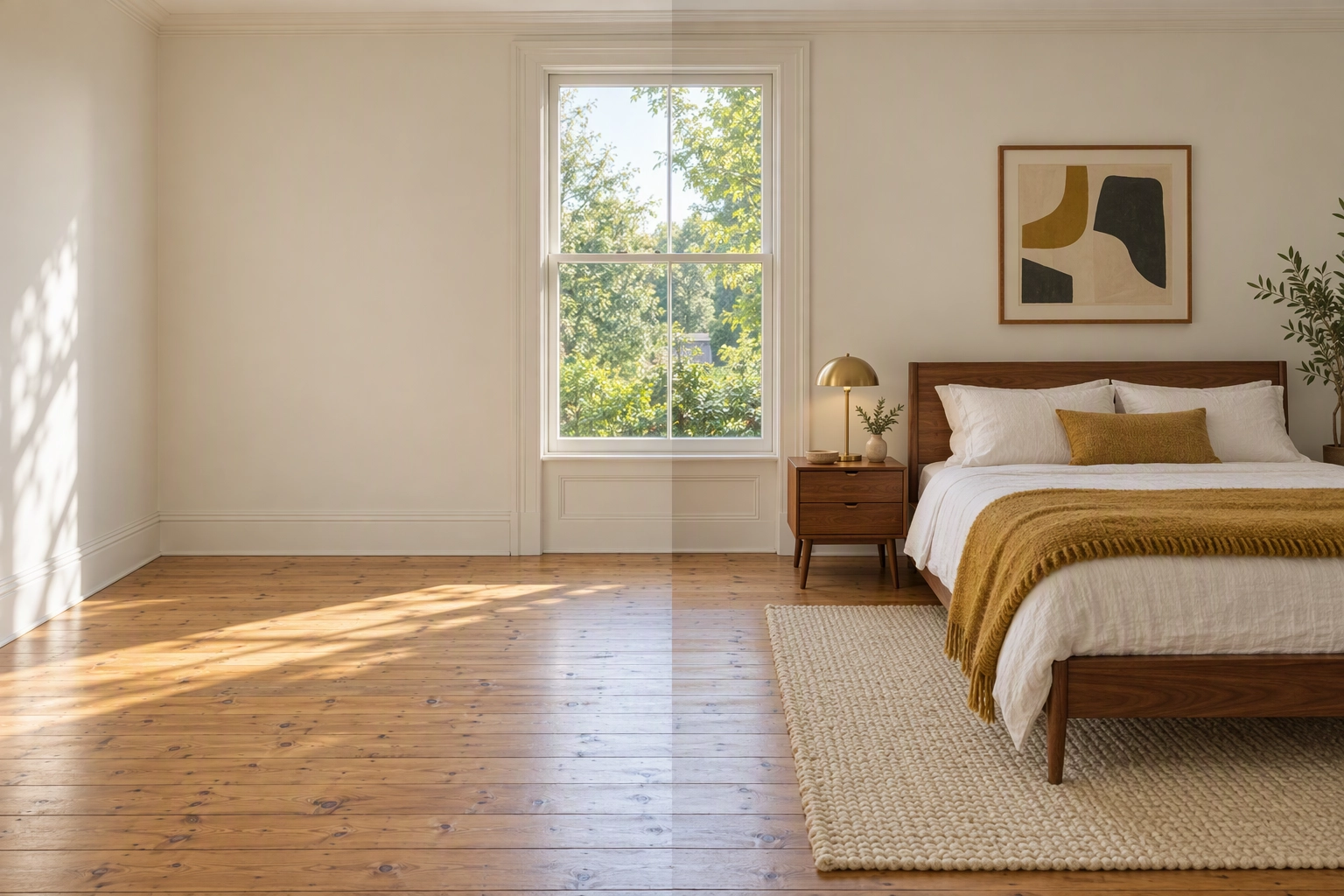
What is virtual staging? It is adding furnishings and decor to a photo of a real room, usually an empty one, with software, so people browsing listings online can judge the room's size and picture living in it. Only movable things are added: the walls, windows, floors and fixtures stay exactly as the camera recorded them.
That second sentence is the part most definitions skip, and it decides whether a staged photo helps a sale or earns a complaint. Below are the five steps behind every render, one empty room furnished three ways with a line-by-line list of what changed and what may not, and where the disclosure rules sit in 2026. To try it on your own room, Plotpane's virtual staging tool furnishes an empty room in one of ten styles for one credit per image, in about two minutes.
Quick Summary: Virtual staging is digital home staging: software or a designer adds sofas, beds, rugs and art to a photo of an empty room, and nothing permanent in the room changes. It costs a few dollars or less per image, against a $1,500 median for a physical staging service (NAR, 2025). It is legal when disclosed: label the photo, say so in the MLS remarks and show the original empty-room photo.
What is virtual staging, and why do agents use it?
Virtual staging, also called virtual home staging or digital staging, is a real estate marketing edit. A photo of a vacant room gets realistic furnishings drawn in at true scale, with light and shadows that match the room. The goal is the same as physical home staging, helping buyers read the space, without a truck, rental fees or a stager's calendar.
Real estate agents use it because most home searches now start on a phone, so the first showing happens there too. In the National Association of Realtors' 2025 Profile of Home Staging, 83% of buyers' agents said staging made it easier to picture a property as a future home. Buyers' agents also rated photos as highly important more often (73%) than physical staging (57%), video (48%) or virtual tours (43%).
The same NAR survey of 1,266 agents put the median price of a staging service at $1,500. In NAR's numbers, 29% of agents saw a 1% to 10% increase in the dollar value of offers on staged homes, and 49% of sellers' agents said staging cut the time on market.
An empty room, by contrast, photographs as a white box with no clue to its size. Is that a bedroom that fits a queen bed, or a study? Staging answers the question before anyone books a showing.
So what is virtual staging not? Three things:
- Not a different house. Furnishings are the only addition. Paint, flooring, cabinets and the view out of the window stay as shot.
- Not a 3D tour. It works on the still photos you already have.
- Not a secret. Every major rulebook allows it on one condition: you disclose it.
How does virtual staging work? The 5 steps
Every render goes through the same five steps, whether a designer builds it over a day or AI software produces it in minutes: capture the empty room, choose a style, place the pieces at true scale, audit the result against the original, then label and disclose it. Most bad renders, and most complaints, come from skipping step 4 or step 5.
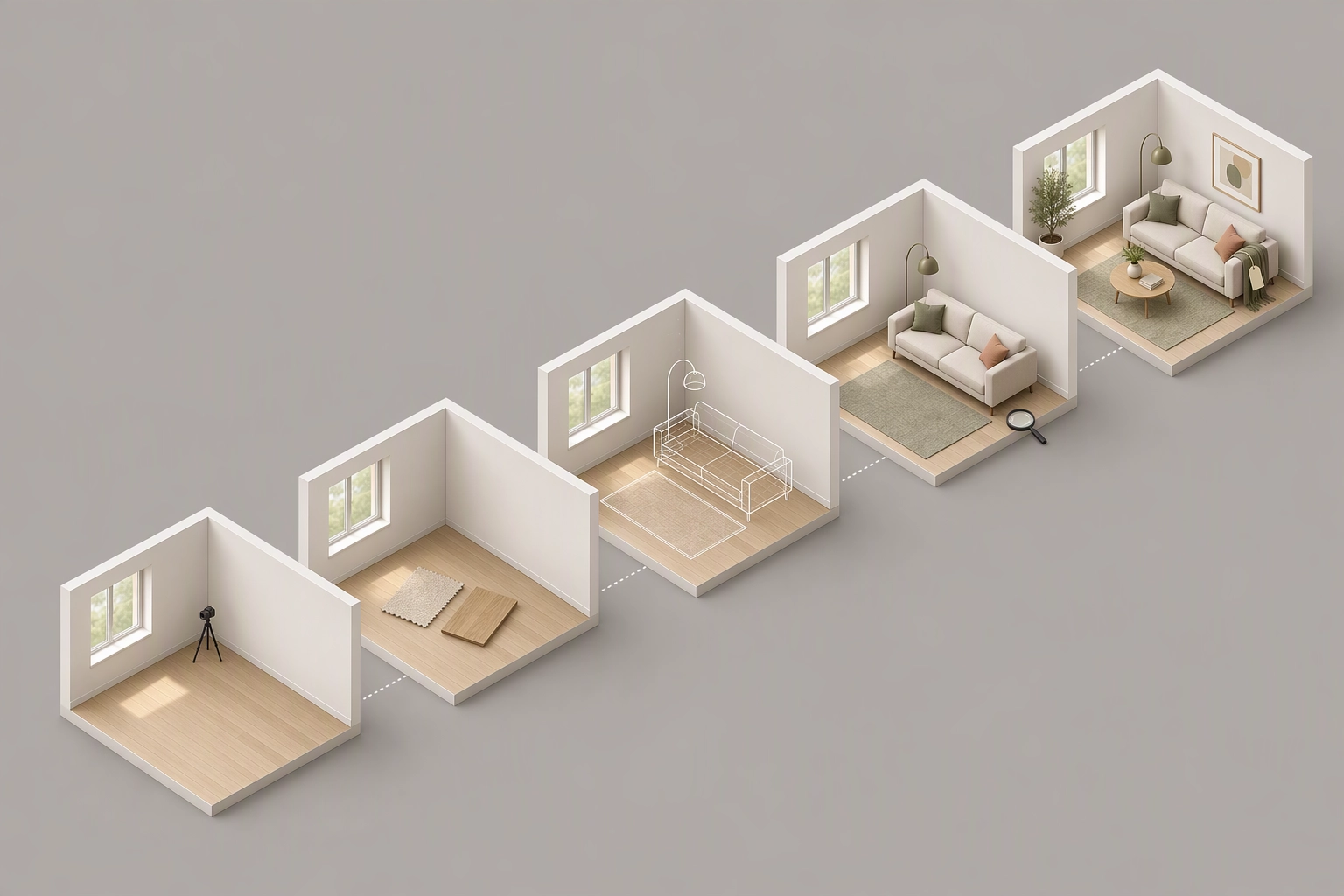
If you are working out how to virtually stage a home yourself, this is the sequence:
- Photograph the empty room. Whether you or a real estate photographer shoots it, work from a corner at about chest height with the camera level, lights on, and expose so the window frames still read. Straight verticals give the software a better read of the floor and walls, and a crop that cuts off the floor leaves nowhere to put a rug. Our interior real estate photography guide covers angles, and Perspective Fix straightens a tilted frame before you stage it.
- Choose the room type and a style. Say what the room is for, because a 10-by-11-foot room can be a bedroom or an office, and pick a look that suits the likely buyer and the architecture (more on choosing below).
- Furnish at true scale. There are two methods. A human designer places 3D models into the photo by hand, matching the camera's perspective and the direction of the window light, and usually returns it in 24 to 48 hours. AI software reads the room's geometry and light and generates the pieces in minutes. AI is faster; a designer gives you a person to ask for changes. Either way the test is the same: legs sit on the floor plane, each piece casts a soft contact shadow, and light falls from the same side as the windows. Our staging software roundup compares nine options by price per room.
- Audit against the original. Put the before and after photos side by side. Walls, windows, floor, fixtures, outlets and the view must match. Then check scale against a door: a standard US interior door is 80 inches tall, chair and sofa seats sit near 18 inches, and dining tabletops near 30. If a sofa seat lines up with the door handle, the pieces are oversized, and the room will look bigger online than in person.
- Label and disclose. Add the label your MLS asks for, write the remarks line, and upload the original photo next to the furnished version.
| Step | What to check | What goes wrong if you skip it |
|---|---|---|
| 1. Capture | Level camera, whole floor in frame, windows readable | Warped walls, nowhere to place a rug |
| 2. Choose | Room type and style match the house and its market | A formal dining set in a starter condo |
| 3. Furnish | Perspective, scale, light direction, contact shadows | Floating sofas, shadows that point the wrong way |
| 4. Audit | Nothing permanent moved; door scale check | A room that looks bigger than it is |
| 5. Disclose | Label, remarks line, original alongside | A complaint, a fine, a buyer who feels misled |
One empty room, three styles: what changed and what never did
Staging should change only what a seller could carry out the front door. In the illustration below, the same empty living room appears furnished in three of Plotpane's ten styles. The sofa, rug, lamps and art differ each time, while the walls, windows, oak floor and ceiling light stay identical in all four frames.
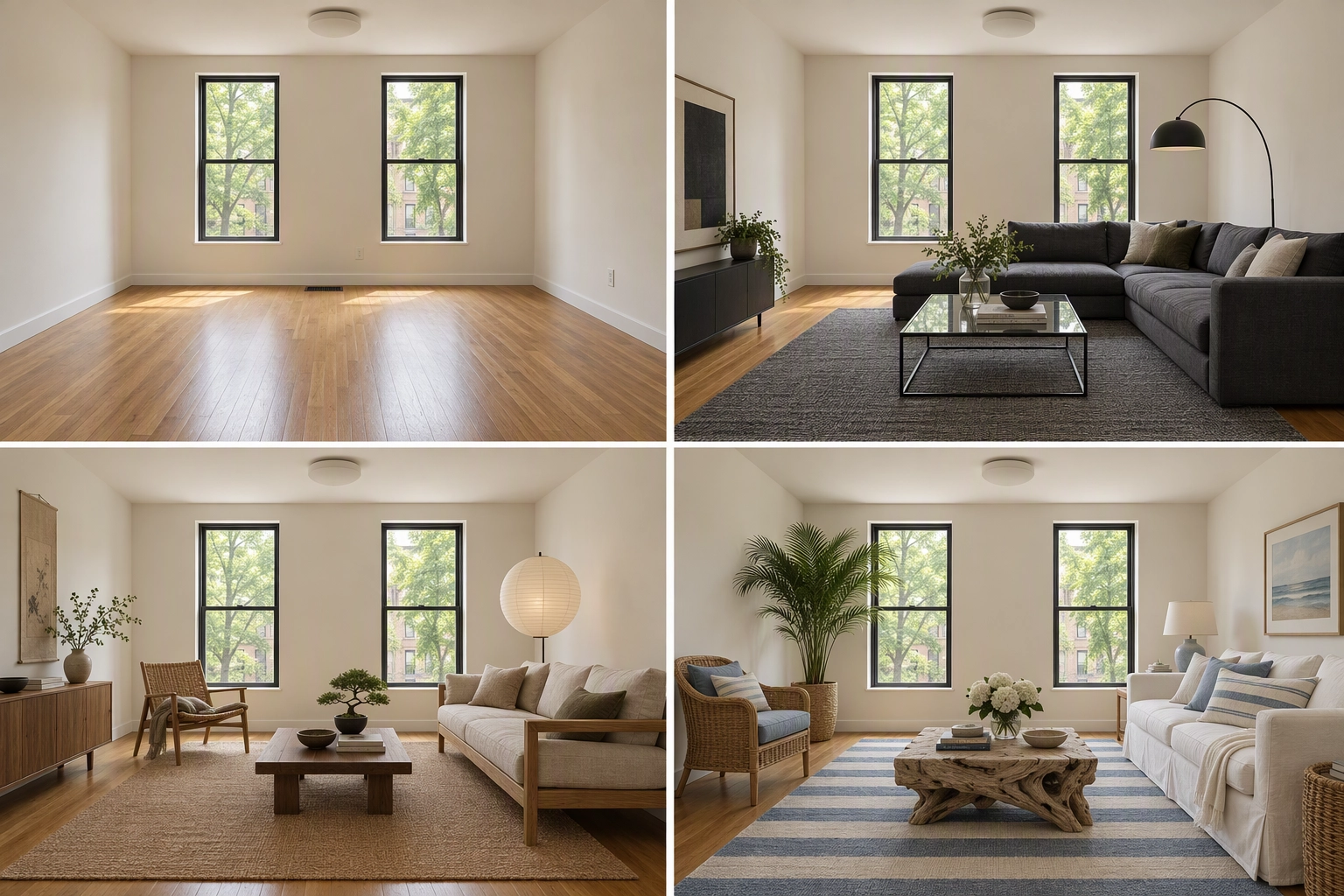
Illustration made for this guide to show the principle, not a product render. It was drawn by a text-to-image model, so the framing drifts slightly between panels; a staging render edits your actual photo, and drift like that is exactly what the step 4 audit should catch. Run your own room through 3 free renders, no card needed, to see real output.
| In the photo | Empty | Modern | Japandi | Coastal | May it change? |
|---|---|---|---|---|---|
| Seating | None | Charcoal low sectional | Low oak-frame sofa in linen | White slipcovered sofa | Yes, it leaves with the seller |
| Rug | Bare oak | Graphite flatweave | Natural jute | Blue-and-cream stripe | Yes |
| Tables, lamps, art, plants | None | Glass table, black arc lamp | Low walnut table, paper lantern | Driftwood table, potted palm | Yes |
| Walls and paint color | Warm white | Same | Same | Same | No |
| Windows, frames, the view | Two tall windows, street trees | Same | Same | Same | No |
| Oak floor, scuffs included | As shot | Same | Same | Same | No |
| Ceiling light, outlets, vent | As shot | Same | Same | Same | No |
| Room size and doorways | As shot | Same | Same | Same | No |
The rule in one line: if it conveys with the sale or sits outside the seller's control, it stays as shot. That includes defects. A digital rug laid over a stained floor hides the stain as surely as erasing it would, and that is misrepresentation even with a label. If a render ever adds or removes something permanent, report it and the credit comes back.
Plotpane offers ten styles: Modern, Scandinavian, Gulf Modern, Luxury, European Classic, Japandi, Coastal, Industrial, Mediterranean and Mid-Century. Match the style to the architecture and the likely buyer, not to your own taste:
- Modern or Scandinavian for new builds, condos and narrow or small rooms, where light pieces keep the floor visible.
- Japandi for minimalist condos and lofts, where low seating shows off the ceiling height.
- Coastal or Mediterranean for beach towns and stucco homes with tile roofs.
- Mid-Century for 1950s and 1960s ranches, Industrial for brick-and-beam lofts, and European Classic for pre-war apartments with moldings.
- Luxury and Gulf Modern for high-end villas, where an ordinary sofa would undersell the room.
Virtual staging vs. virtual renovation vs. traditional home staging
Virtual staging adds movable pieces to a photo. Virtual renovation changes the house itself in the photo: paint, floors, counters, cabinets. Traditional home staging brings real furniture in on a truck. They differ in what changes, price, speed and disclosure risk, and only staging, digital or physical, leaves the property's finishes exactly as they are.
| Virtual staging | Virtual renovation | Traditional home staging | |
|---|---|---|---|
| What changes | Movable pieces added to the photo | Permanent finishes in the photo | Real pieces placed in the home |
| Typical price | Under $1 to $75+ per image | Custom rendering quotes | $1,500 median service (NAR 2025) |
| Turnaround | Minutes (AI) to 48 hours (designer) | Days | Days to weeks |
| There at the open house | No | No | Yes |
| Disclosure | Label plus the original photo | Stricter, and often barred from MLS photos | Not needed |
Plotpane does not do virtual renovation. Nothing in it repaints a wall, re-tiles a floor or swaps a countertop, because guessing at a surface you never pointed to is how a furnished photo turns into a different house. Our help page on staging vs. renovation explains the line. If a room is dated, stage it honestly and let the finishes show.
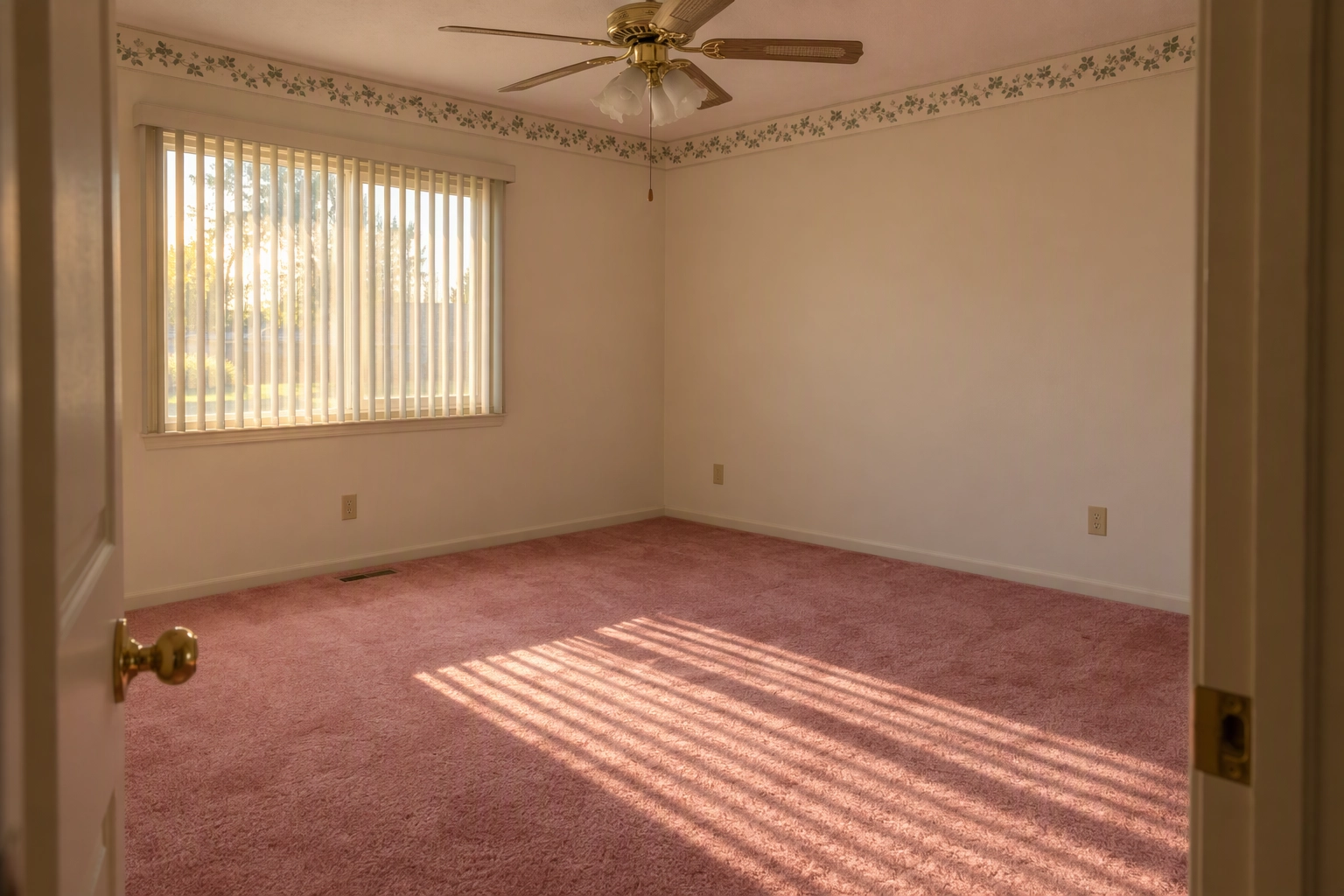
Furnished or cluttered rooms need one extra step. Remove the seller's things first with Clutter Removal, then stage the cleared room: two renders, so two credits. For the full side-by-side on speed and money, see physical vs. digital staging.
Is virtual staging allowed? Disclosure in three places
Yes. No US law bans it; the rules require honesty. Disclose it, and never use it to hide a defect or invent a feature. Since January 1, 2026, California's AB 723 has required a statement that the image was altered plus a link or QR code to the unaltered original, and Wisconsin's rule follows on January 1, 2027.
The NAR Code of Ethics already asks Realtors to "present a true picture" in their advertising and marketing (Article 12). In practice, disclosure lives in three places:
- On or next to each photo, in the form your MLS asks for: a caption, the photo description field or text on the image itself.
- In the listing remarks, for example: "Living room and primary bedroom photos are virtually staged. Furniture is not included in the sale."
- The original photo, uploaded beside the furnished version, and linked by URL or QR code in California.
Where Plotpane fits: every export carries invisible XMP disclosure metadata, a machine-readable record that travels with the file, and you can switch on a visible "Virtually Staged" label for boards that want text on the image. What it does not do is write your MLS remarks or upload your originals. That part stays with the listing agent. Boards also disagree on placement: CRMLS wants the photo description field, while Stellar MLS wants set wording at the start of the public remarks. Check your board in our MLS disclosure guide, or read the long answer to is virtual staging legal.
Is virtual staging worth it, and what does it cost?
For vacant, online-first and budget-limited listings, usually yes: it costs a few dollars or less per photo and helps buyers read an empty room. It is weaker for luxury homes that depend on open houses, where real furniture at the showing does work no photo can. The data and the objections are in our guide to is virtual staging worth it.

Prices fall into three bands, per our virtual staging cost breakdown: DIY AI apps at roughly $0.15 to $5 per image, human designers at $16 to $75 or more per image, and monthly subscriptions. Plotpane charges one credit per image whichever of its seven edits you run, on plans from $39 a month billed yearly for 100 credits; the pricing page has all three. The days-on-market math shows when that pays back, and vacant home staging prices a whole empty house staged both ways.
Two cases where it is the wrong call: an occupied home that needs decluttering more than new pieces, and a property whose condition is the real problem. Staging changes how a room reads, not what the house is.
Frequently Asked Questions
What is virtual staging in real estate used for?
Mostly for selling vacant homes: new builds, estate sales, relocations and rentals between tenants. It shows how a room can be used and how big it is, which a bare photo often can't. Developers use it for unsold units, real estate photographers sell it as an add-on, and short-term rental hosts use it on listings when a refreshed look is planned but not yet bought.
How long does virtual staging take?
With AI software, minutes. Plotpane returns each render in about two minutes and runs three at a time. Human designer services usually take 24 to 48 hours, and physical staging takes days to arrange.
Can you stage a room that still has furniture in it?
Yes, in two steps: remove the existing pieces, then stage the cleared room. Both edits change what is in the photo, so both need the same disclosure, and the original should show the room as it really is.
Will buyers know a photo was virtually staged?
They should, because you tell them. A disclosed, well-scaled render reads as a preview of what the room can hold. An undisclosed one tends to surface at the showing, when the room is empty, and that costs trust at the worst moment. Posting the original photos next to the furnished ones removes the surprise.