Plotpane · United States · commercial property shoots
United States · commercial property shoots
Commercial real estate photography, after the shoot
A commercial shoot is not one hero frame. An office floor, a retail strip or an industrial unit comes back as forty to eighty exposures, and every one of them needs the same correction applied the same way — or the set reads as three different buildings by the time it lands in the offering memorandum. PlotPane is the post-production half of that job and nothing else. It does not shoot the building, fly the drone or draw the floor plan. It fixes the frames after you do, in batches, at one credit each.
Take the plainest version first, so nobody buys the wrong thing. PlotPane has seven tools — Auto Enhance, Perspective Fix, Sky Swap, Lawn & Pool Revive, Clutter Removal, Day to Dusk and Virtual Staging — and every render of every tool costs exactly one credit. You upload finished frames, choose one tool and its settings, and run it across the batch: ten photos at once on Starter, 50 on Pro, 150 on Agency. A render takes about two minutes, measured, and comes back as a JPEG at quality 92, about 2.4K, with no watermark on any paid plan. Pro and Agency pull the finished property down as a ZIP. What it does not do is the other half of a commercial photography package. It does not operate a camera, fly a Part 107 drone, cut video, measure or draw a floor plan, or produce a Matterport tour. There is no API, no Buildout or CoStar integration, no team seats and no shared brand presets — you download the files and upload them yourself, the way you do now. If you were hoping it would replace a photographer, it replaces the retoucher instead.
02
What a commercial set actually breaks on, and which tool answers it
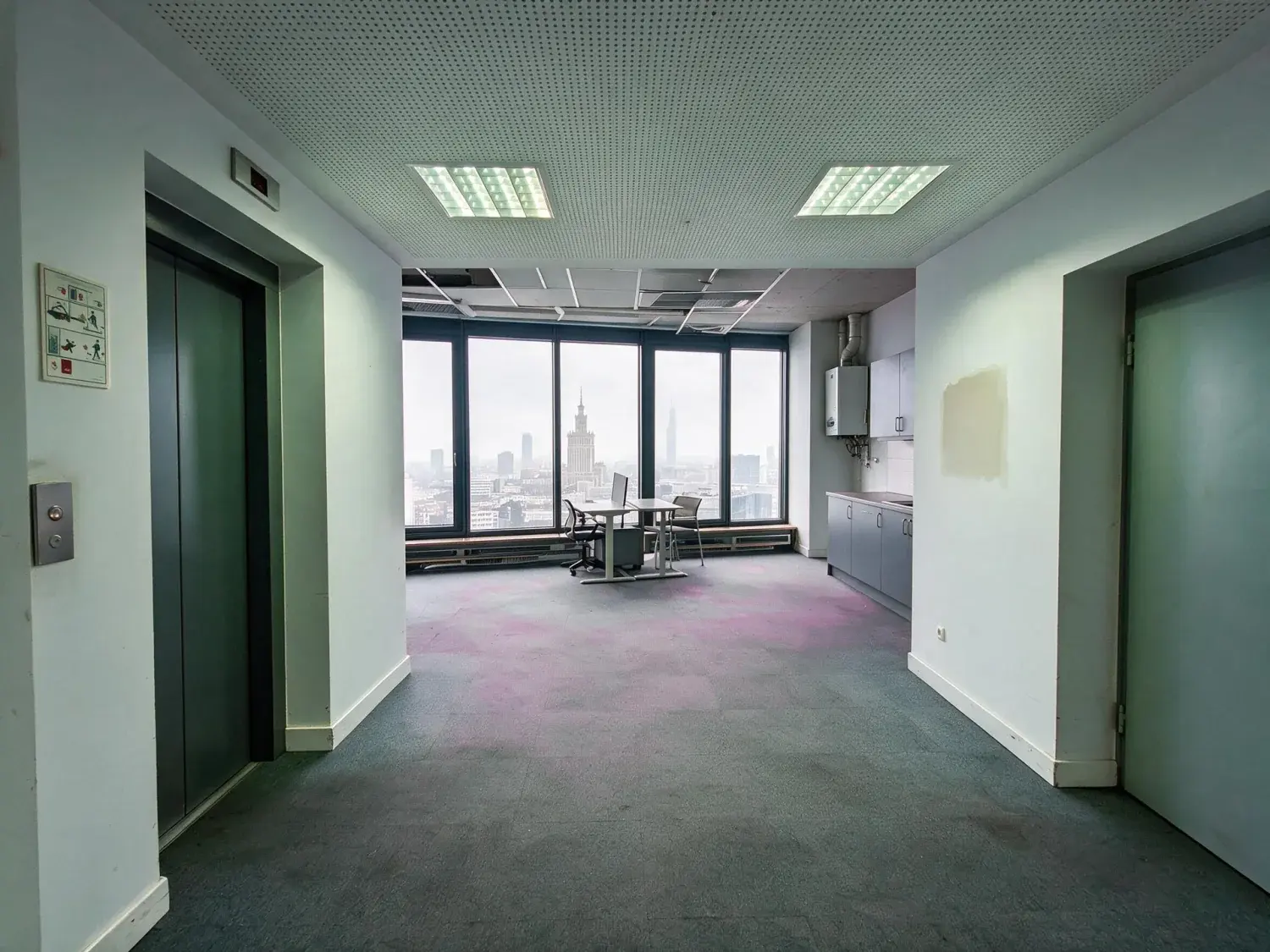
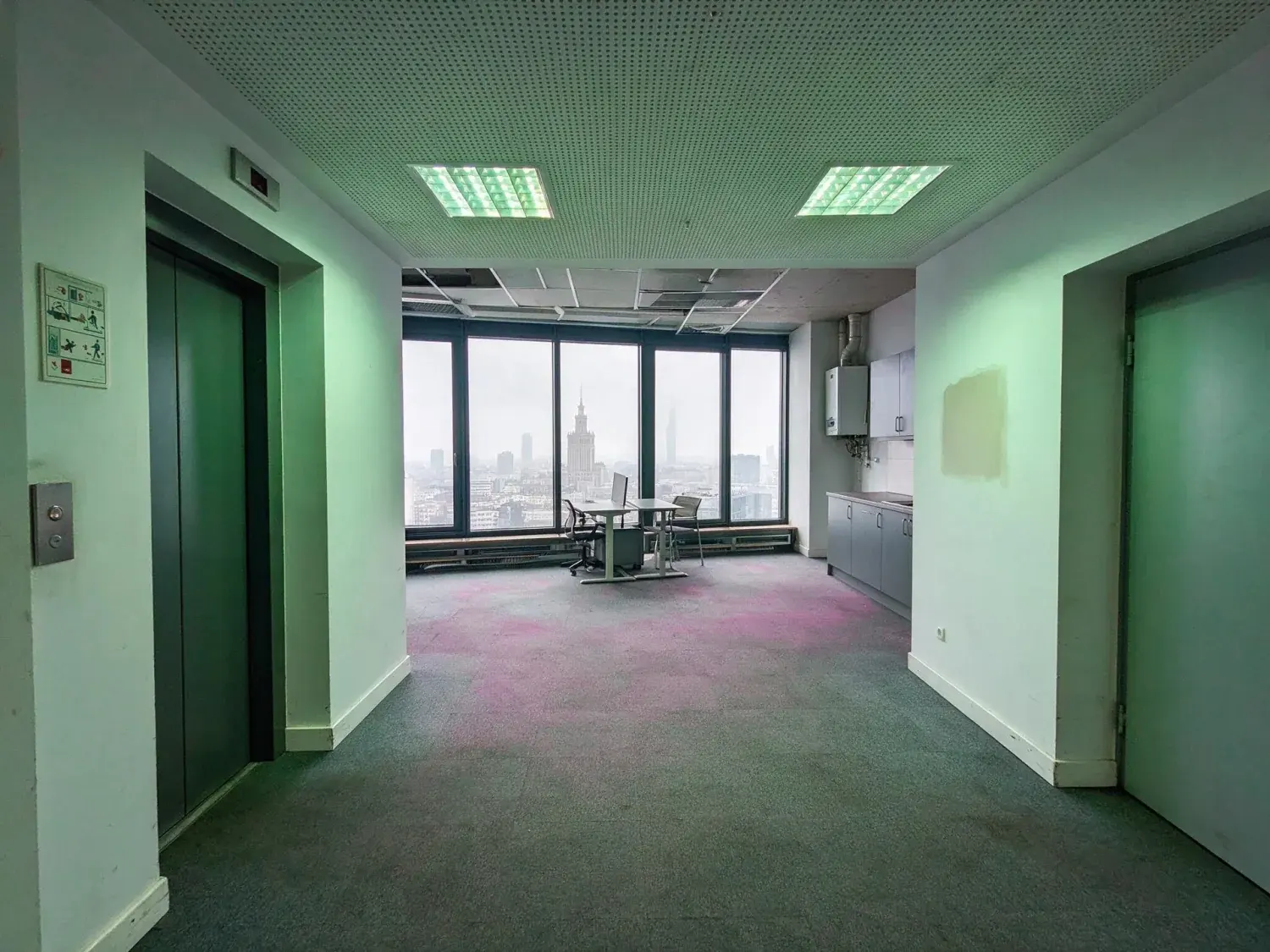
Commercial interiors fail in camera in ways a three-bed house does not. A Grade-A floor is lit by a curtain wall on one elevation and 4000K LED panels everywhere else, so exposing for the glass drops the room three stops and exposing for the room blows the window to blank paper, while the mixed sources leave a green-cyan cast on white walls and a muddy magenta in the carpet tile. To get the ceiling grid and the clear height into frame you tip the camera back, and every structural column and curtain-wall mullion leans inward. On an industrial unit the dock elevation sits under a flat overcast with no cloud structure in it at all, so the cladding reads dull pewter and the top half of the frame is dead. On hand-back day the outgoing tenant's stacked chairs, flattened boxes, wheelie bin and mop bucket are still standing in the suite you have to market on Monday. Each of those has one tool, and one tool is one credit. Virtual Staging is the weak one here and worth saying so: its six room briefs are residential — living, bedroom, dining, kitchen, home office, outdoor — so an empty open-plan floor or a shell retail unit has no matching brief.
Auto Enhance — mixed daylight and panel light neutralised, existing window detail recovered, handheld tilt levelled
Perspective Fix — converging columns and mullions squared, minimal crop, no exposure or colour change at all
Clutter Removal — you name the objects; it removes those and leaves everything else standing
Sky Swap — clear blue, soft clouds, golden hour or dramatic storm over a dock, yard or forecourt elevation
Day to Dusk — a showroom or retail frontage moved to the hour the canopy lighting and the interior read
Lawn & Pool Revive — burnt-off business-park turf and a green entrance water feature, inside their existing boundaries
Virtual Staging — six room briefs, all residential; no office fit-out or retail brief exists
03
Where the files end up: LoopNet, CoStar, Crexi and the OM
Residential has one destination and a rulebook for it. Commercial has four or five destinations and no rulebook. The same set goes up on LoopNet and CoStar — the same company since CoStar Group bought LoopNet in 2012, but different audiences, broker-facing marketing on one and institutional research on the other — then on Crexi, then on your own firm's site, then into the offering memorandum your team builds in Buildout, RealNex or InDesign. All of them ingest JPEG, and every portal re-encodes whatever you hand it for its own gallery, which is the argument for sending a clean, unsharpened master rather than something already crunched for the web: what survives a re-encode is mid-tone detail, not crunch. The OM is the one that is not a web surface at all. It ships as a PDF and somebody on the acquisitions side prints it, so a hero cropped across a spread is exactly where an undersized file shows. PlotPane exports JPEG at quality 92, about 2.4K as standard and about 4.7K if you spend a second credit on the larger pass, which is the one to use on a hero headed for print. There is no upload integration and nothing pushes to a portal for you — the ZIP on Pro and Agency is the whole delivery mechanism.
04
Disclosure, and the edits the engine refuses to make
Commercial has no MLS photo policy to hide behind. No CRE platform writes you a rule about altered images the way a residential MLS does, so the obligation falls back on the broker's own advertising duty: Article 12 of the NAR Code of Ethics, which requires members to present a true picture in their advertising; state licensing law on misleading advertising; and the FTC's general deception standard. The practical stake is the higher one. A tenant rep or an acquisitions analyst checks your interior frames against the as-built plan, and an invented column costs more than a flat photo ever did, so the engine refuses the edits that cause it. It changes only what the instruction names. It will not remove, soften or conceal a defect, stain or crack — Clutter Removal takes the objects you list and nothing that merely resembles them. Under Perspective Fix, Clutter Removal and Virtual Staging it is explicitly barred from changing what is visible through glass, so a blown-out window stays blown out rather than acquiring a skyline; Auto Enhance recovers what is already in the window and may not add what is not. Every export carries XMP metadata naming the operation, the engine and the timestamp, and a visible "Virtually Staged" label is available per render.
05
What a sixty-frame property costs, and when this is the wrong tool
Do the arithmetic before subscribing: the plan that fits depends on how many properties you shoot, not how large they are. Starter is $49 for 100 credits, $0.49 an image; Pro $99 for 220, about 45 cents; Agency $249 for 600, about 41 cents. Annual billing takes those to $39, $79 and $199 a month. One credit is one render of one image, whichever tool. A sixty-frame office floor run once through Auto Enhance is sixty credits — about a quarter of a Pro month — and Pro caps at 50 photos at a time, so that is two batches. Agency takes it in one. Anything you run twice costs twice: Perspective Fix on the dozen tipped frames and then Auto Enhance on all sixty is 72 credits, because no pipeline stacks two operations into a single render. Two more things catch people out. Subscription credits reset each period and do not roll over — there is no top-up and no carrying a balance forward — so a seasonal shooter pays for the quiet months. And a bracketed mirrorless set still gets merged in Lightroom first: PlotPane takes one frame in and one JPEG out. The individual CR3s upload fine — JPEG, PNG, WebP, HEIC and camera RAW all go in — but PlotPane reads the full-size JPEG the camera wrote inside a RAW rather than developing it, so neither the merge nor the highlight recovery is something it can do for you. Shooting one small unit a month, a freelance editor at a per-image rate is cheaper than any of this.
For this region
Local questions, answered
What is included in a commercial real estate photography package?+
Usually: exterior elevations, an entrance or lobby set, interior stills of every marketable space, often a twilight frame of the hero elevation, and then — priced separately more often than not — aerials flown by a Part 107 operator, walkthrough video, a floor plan, and the usage licence that says where the broker may publish the images and for how long. Edited delivery is normally part of the fee, at a stated turnaround. PlotPane is only that last line. Seven tools, one credit per image whichever one you use, about two minutes per render, out as a JPEG at quality 92, about 2.4K. It does not shoot, fly, film or measure. If you are the photographer, it is what you run instead of sending the set to a retoucher; if you are the broker, it is what you run on the frames a property manager already took on a phone.
Is real estate photography commercial photography?+
In the trade sense yes — the images exist so a business can advertise with them, which makes them commercial rather than editorial or personal work, and they are normally delivered under a usage licence to the listing brokerage or the owner rather than sold outright. Read your own contract on that; it is the part people skip. The distinction that matters day to day is the one inside the trade: a residential shoot is a small set governed by an MLS photo policy, while a commercial shoot is a large set with no MLS behind it and an offering memorandum at the end of it. PlotPane treats both files identically and charges the same one credit for either. It has no view on who owns the image or what licence you granted.
How do you do commercial real estate photography?+
Tripod, levelled, and bracket every frame — the curtain wall and the interior are never one exposure. Stay around a 24-28mm equivalent, wide enough to read the floor plate without bending the ends of the building. Keep the camera at chest height and shoot straight rather than tipping back for the ceiling grid, because tipping back is what makes the columns lean. Photograph the dock or yard elevation with the sun behind you and get the clear height honestly, since it is the number an industrial tenant underwrites against. Get written permission for tenanted space and keep occupants and readable signage out of frame. Then bring the frames in — a merged JPEG if you bracketed, or the raw straight off the card for single exposures, from which PlotPane reads the camera's embedded full-size JPEG rather than developing it — and batch them through one tool with one setting so the whole property carries a single grade.
Can PlotPane batch a whole sixty-frame commercial property at once?+
Not on every plan. The batch ceiling is 10 photos on Starter, 50 on Pro and 150 on Agency, so sixty frames is two drops on Pro and one on Agency. Each image costs one credit and takes about two minutes to render, and the batch runs the same tool and the same settings across everything in it, which is the point — one setting per property rather than sixty individual decisions. Pro and Agency download the finished set as a ZIP; Starter downloads images one at a time. If a render fails, the credit is returned rather than spent.
Does PlotPane do drone photography or video for commercial listings?+
No. It is a stills editor and nothing else. Aerials, walkthrough video, virtual tours, floor plans and measured surveys are all outside what it does, and it has no way to process a video file at all. If your commercial package includes drone work, you still need a Part 107 operator and you still edit that footage somewhere else. What PlotPane will do is take the JPEG stills from any of those shoots — including the frames pulled from a drone's stills mode — and run the same correction across the set.
What do I have to disclose on an edited commercial listing photo?+
There is no CRE listing platform writing you a photo rule the way a residential MLS does, so the standard that binds you is your own advertising duty: Article 12 of the NAR Code of Ethics for REALTOR members, state licensing law on misleading advertising, and the FTC's deception standard. In practice that means an edit that changes what a counterparty would underwrite — a wall that is not there, a defect painted out, a view invented through glass — is the problem, and cosmetic exposure and colour work is not. Every PlotPane export carries XMP metadata recording the operation, the engine and the timestamp, so the edit chain travels with the file into your archive. A visible "Virtually Staged" label can be switched on per render when you want the mark on the image itself.
What file types does it take, and what does it give back?+
In: JPEG, PNG, WebP and HEIC, up to 25MB per file. Camera RAW uploads too, but it is not developed: PlotPane reads the full-size JPEG the camera already wrote inside the file. A bracketed CR3, NEF or ARW set still has to be merged in Lightroom or Capture One and exported as a JPEG, because PlotPane takes one frame per render — and if you want your own exposure and white balance rather than the camera's, that work belongs in the raw converter too, since PlotPane renders from the pixels you upload. Out: JPEG at quality 92, about 2.4K as standard or about 4.7K for a second credit, with the XMP disclosure packet embedded. There is no layered file and no transparency channel, so if your OM designer wants a cut-out, that is still a job for Photoshop.
Pricing
One credit per image. Every tool, every plan.
Three plans. Every tool unlocked on all of them. Every render unmarked, standard or high resolution, cancel anytime.
Every plan starts with 3 free renders. No card until you subscribe.
Starter
For the solo agent shooting their own listings.
$39/month
billed yearly
100 credits monthly
100 images per month — 1 credit each, whichever tool you use
No Plotpane mark on any render
Every tool, no tier gating
Standard output ~2.4K, or ~4.7K for a second credit
XMP disclosure metadata written into every export
Download a finished listing as a ZIP
Free vertical listing reel from your finished photos
Cinematic clips from a single photo — 1 credit per second of video
That is the whole pricing model. No per-tool rates, no seat maths, nothing to negotiate. We are not SOC 2 certified and there is no SSO, private deployment or API — if you need those to buy, better you know now than after a call.
Starter
4
listings a month
Pro
8
listings a month
Agency
24
listings a month
Questions
The usual questions, answered directly.
No. Midjourney and DALL-E invent scenes from text prompts — beautiful for art, disqualifying for a listing. Plotpane is a structure-preserving pipeline: your room geometry, windows, and floor plan stay exact. We stage, re-light, swap skies, declutter, and enhance your actual photo. No hallucinated architecture, no invented rooms.
BoxBrownie and Styldod are human-edit services: you upload, a retoucher works overnight, you get a result in 24–48 hours at $2–$32 per image per treatment. They also sell things we do not have at all — floor plans, renderings, item removal by a person who can ask you what you meant. Plotpane is one machine pass: you pick one of seven tools, and the image comes back in about two minutes for one credit, whichever tool you picked, on a flat monthly subscription. Stacking two treatments on one photo means running it twice.
Yes, when disclosed. NAR guidelines, California AB 723, and REBNY Rule 3.3 all allow virtually staged photos provided the listing discloses them. Every Plotpane export embeds invisible XMP disclosure metadata so the staging record travels with the file. You still handle the listing-remarks disclosure in your MLS portal — that's the part only you can do.
Every render is sent with a preserve list as well as an instruction. It names one operation and forbids the rest: do not touch windows, doors, walls, ceilings, floors, cabinetry or fixtures unless the instruction names them; do not remove or conceal a defect, stain or crack; do not change what is visible through glass, and never invent a view. Furniture is added to empty rooms; named objects are removed from furnished ones; sky and light are re-graded. If you do see something invented, that is a bug — report the render in the app and the credit comes back.
Yes — one click in the Stripe billing portal from your dashboard. Billing stops immediately, remaining credits stay usable through the end of the billing period, and there's no cancellation fee.
Yes — any AI-generated or AI-modified image is considered an edit requiring disclosure under NAR's standards. That's why every Plotpane export writes invisible XMP disclosure metadata by default. The flag is machine-readable by MLS tooling and survives Lightroom round-trips. You still add the disclosure line to your listing remarks; we make sure the image itself is self-describing.
The toolkit
Seven tools. One credit each.
Every one is a single structure-preserving pass: it changes what you asked for and leaves the building alone.