Plotpane · Australia
Australia

Real estate photo editing for Australian listings

Real estate photo editing in Australia is bought overnight. You shoot a campaign on Tuesday, send the brackets to an editing house in Manila or Ahmedabad that evening, and the merged files land Wednesday morning — one revision on the sky and you are into Thursday, with the listing due live before the Saturday open. PlotPane is the other shape of the same job: upload one JPEG, pick one tool, get a JPEG at quality 92, about 2.4K, back in about two minutes. Auto Enhance for exposure and colour, Perspective Fix for leaning verticals, Sky Swap for a bleached December sky, plus Clutter Removal, Lawn & Pool Revive, Day to Dusk and Virtual Staging. One credit per image, whichever tool you pick. No watermark, and an XMP disclosure record written into every file.

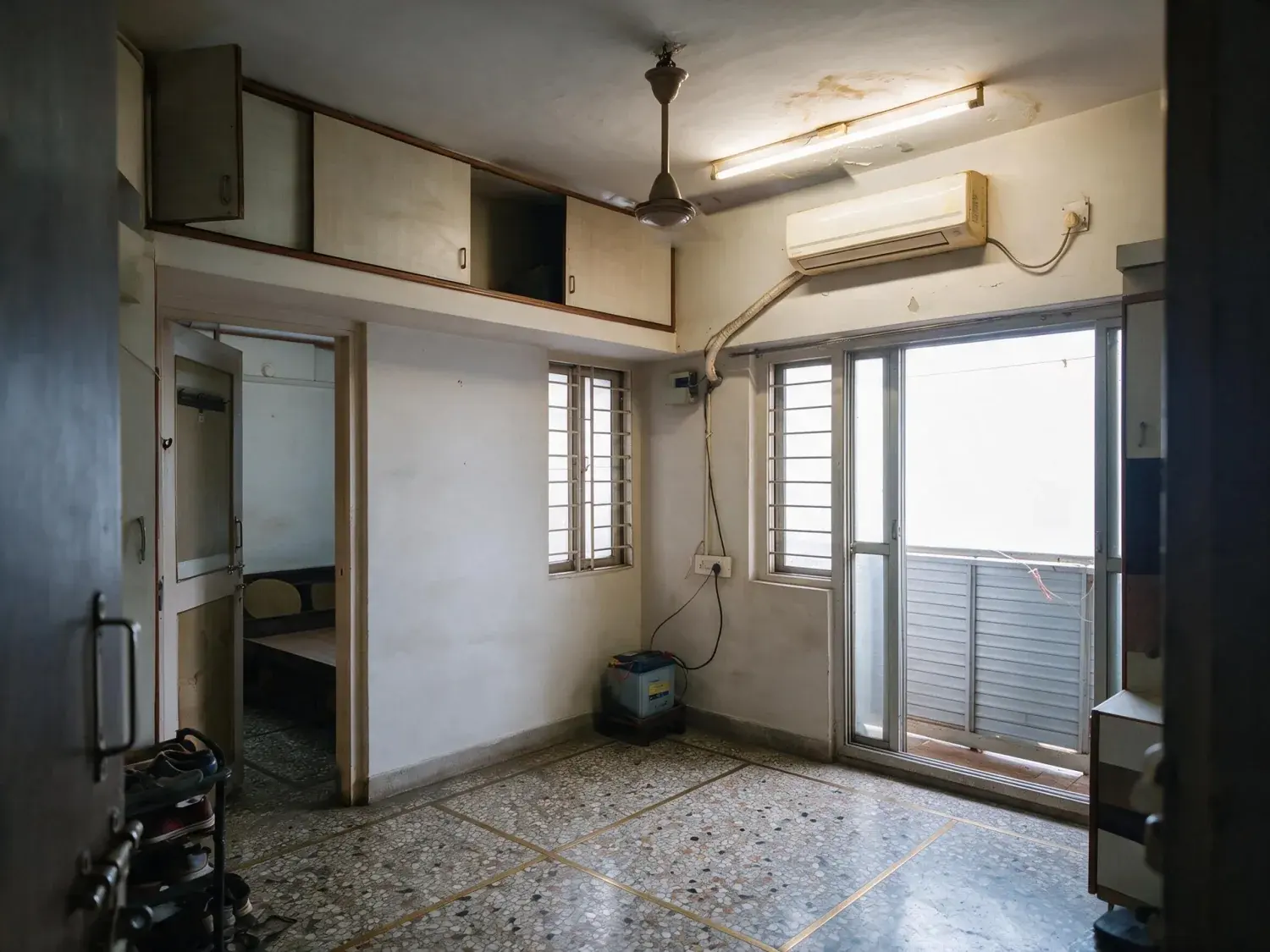
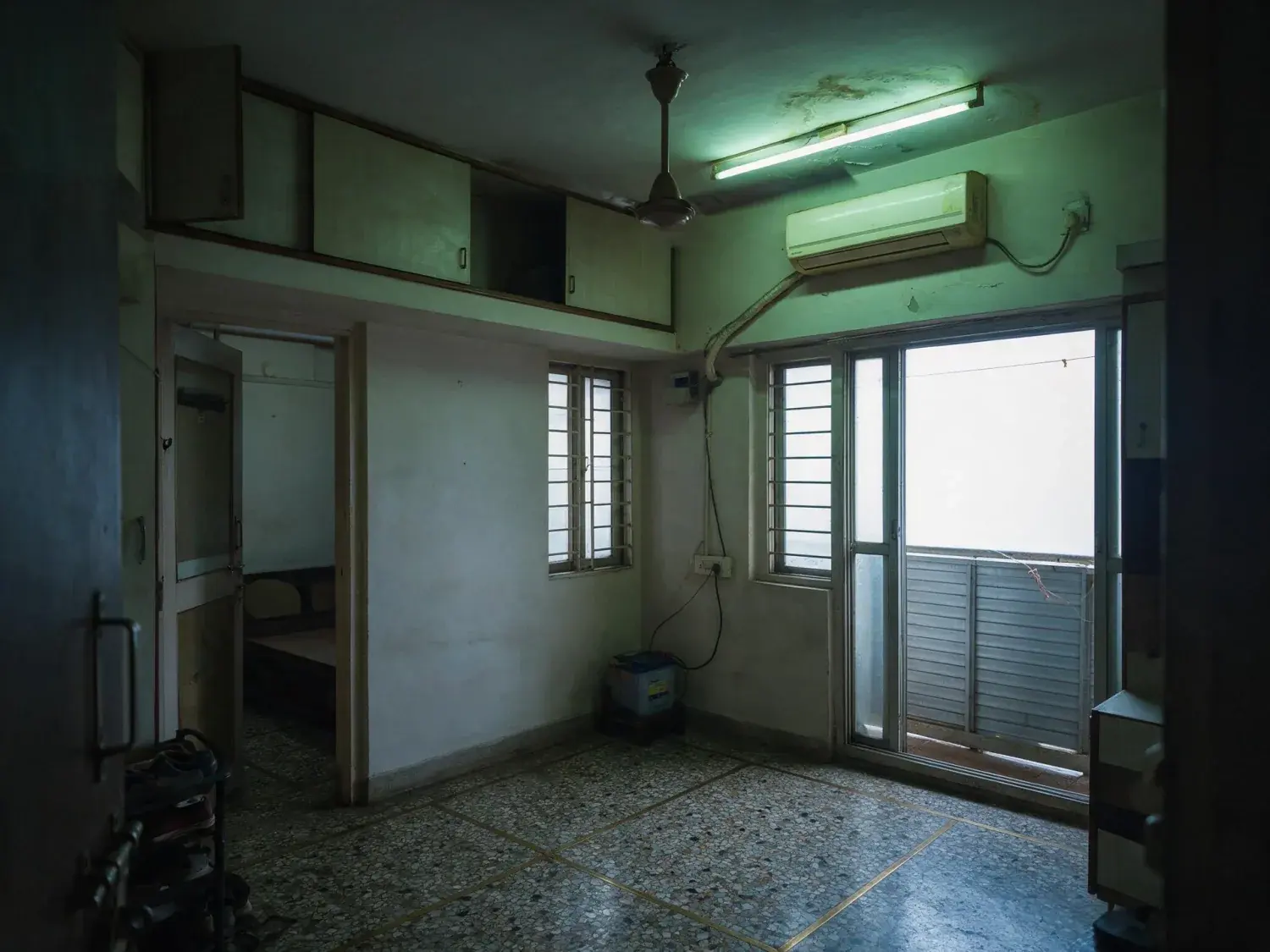
Before and after of a bandra one-bedroom photographed on a phone against a monsoon-grey window, so the room sits dark and the tube light throws everything green — enhanced by Plotpane
Before and after of a bandra one-bedroom photographed on a phone against a monsoon-grey window, so the room sits dark and the tube light throws everything green — original listing photo before editing
BeforeAfter
01

Why real estate photo editing in Australia still runs overnight

The standard Australian arrangement is per-image and offshore. A photographer shoots bracketed exposures room by room on a tripod, uploads the set at the end of the day, and an editor merges, blends and retouches while the shooter sleeps. Manila sits two hours behind eastern-seaboard time — three once daylight saving starts — and Ahmedabad four and a half, which is exactly why the promise is "back by the next morning" rather than same day. It works. What it costs is the calendar. A Tuesday shoot lands Wednesday morning; you open the set, decide the sky on the front elevation went too blue and the kitchen reads flat, and the revision comes back Thursday. The campaign is booked for Saturday and the listing wants to be live on realestate.com.au and Domain by Wednesday night to catch the weekend search. Two of those days are spent waiting rather than working. PlotPane does not replace the merge, and it does not replace your editor across a full campaign. It closes the gap where one frame has to be right now: the vendor's own photo of the granny flat, the elevation you shot at 2pm on a valuation visit, the single image the revision was about.

  • One upload, one tool, a JPEG at quality 92, about 2.4K, in about two minutes
  • No revision ticket, no overnight cycle, no per-image invoice
  • Not a replacement for a photographer or a full-campaign edit
02

Real estate picture editing, tool by tool, one credit each

Seven tools ship, each render does exactly one job, and each costs a single credit. Auto Enhance is the workhorse: a lounge shot from the hallway of a single-fronted terrace, exposed for the window so the room sits two stops under while the glass burns out and the downlights push everything green. It corrects exposure, white balance and colour and recovers what is already visible through the glass — it will not invent a harbour view that was never in the frame. Perspective Fix squares the leaning verticals a phone gives you when it is tilted up in a narrow hallway. Sky Swap replaces a bleached January sky over brick veneer or Colorbond and matches the light on the facade; it adds no skyline and no landmark. Lawn & Pool Revive works on kikuyu and buffalo browned off at the end of summer and on a pool gone green between services, inside the existing boundaries of both. Clutter Removal takes objects you name — the red-lidded wheelie bin at the kerb, the ute in the driveway, the trampoline, the neighbour's boat trailer — and anything you do not name stays. Day to Dusk relights a daytime elevation. Virtual Staging furnishes an empty room in one of ten styles across six room types.

03

HDR brackets: real estate photography photo editing in Lightroom and Photoshop

This is where most of the real question volume sits, so the boundary should be blunt: PlotPane takes one image and does not merge brackets. If you shoot the usual three to seven frames two stops apart on a tripod, the merge still happens in your own software — Lightroom's Photo Merge to HDR, Photomatix or Aurora for a tone-mapped result, or the flambient method in Photoshop where the ambient frame carries the colour, the flash frame carries the detail, and a window pull is masked back in by hand. That last one is what the careful Australian shooters actually do, and it is why a bracket set costs an editor real minutes per room rather than one click. Nor does PlotPane read raw. Input is a JPEG, so a CR3, NEF, ARW or DNG has to be exported first — which you are doing anyway before anything reaches a portal. Where the tool fits is either side of the merge: a single ambient JPEG that needs exposure and colour pulled back into shape with no bracket set at all, or a merged file that came back from the editor with the sky still wrong. Verticals are the same story — Guided Upright and Perspective Fix solve one problem, one with sliders and one without.

  • In: JPEG, PNG, WebP, HEIC. No raw — export from Lightroom or Capture One first
  • One file per render: three bracketed exposures are three files, not a stack
  • Out: a JPEG at quality 92, about 2.4K, no watermark on any paid plan
04

realestate.com.au and Domain: what the file actually has to be

Neither portal is somewhere you upload photos by hand. The listing leaves your CRM — VaultRE, Agentbox, Rex, Box+Dice, Eagle Agent — as a feed, and the images travel as JPEG files alongside the XML, numbered in the order they will appear. The first one is the whole game: it is the card in the search results and the hero on a Premiere listing on realestate.com.au or a Platinum on Domain, and it gets cropped to landscape, so a portrait frame loses its edges. Resolution is rarely what gets an image rejected — both portals re-encode whatever you send. Floorplans go up as their own image type, not as photo eight. PlotPane exports a JPEG at quality 92, about 2.4K, with no watermark on any paid plan, which matters because a burned-in editor's stamp is a genuine reason to have a photo pulled. A phone photo exported to JPEG goes straight in. What does not exist is any integration: no API, no CRM connection, no listing feed, nothing that pushes an image to REA or Domain. You download the finished file and load it the way you already do.

  • First image is the search card and the hero — shoot and export landscape
  • JPEG at quality 92, about 2.4K, no watermark on any plan
  • No API, no CRM integration, no portal push — you upload it yourself
05

Disclosure: what an edited listing photo has to survive here

The operative rule is not a portal policy, it is the Australian Consumer Law — Schedule 2 of the Competition and Consumer Act 2010. Section 18 prohibits misleading or deceptive conduct, and section 30 covers false or misleading representations about the sale of land, enforced by the ACCC and state regulators. On top of that sits state agent law: section 52 of the Property and Stock Agents Act 2002 in New South Wales makes it an offence for a licensee to induce someone into a contract by a false, misleading or deceptive statement or by concealing a material fact, and Consumer Affairs Victoria and the Queensland Office of Fair Trading run the same line. None of it names virtual staging, which is why the industry convention does the work: label the image, the way an off-the-plan render is labelled an artist's impression, and keep an unfurnished frame of the same room in the gallery. PlotPane writes an XMP disclosure record into every export — operation, engine, timestamp — and offers an optional visible "Virtually Staged" label per render. It also refuses in the other direction: no tool here removes a crack, a rust run below a gutter bracket or a damp stain, because concealing a defect is what the legislation is actually about. Compliance stays your agency's call, not ours.

06

Real estate image editing across a whole campaign

Real estate photography editing at campaign volume is twenty-five to forty frames a listing, so the batch ceiling matters more than the per-image speed. Starter runs five photos at once, Pro twenty-five, Agency a hundred, with one style across the batch and a ZIP download on Pro and Agency. Every image in a batch is still its own render, still one credit, still about two minutes, so a forty-image set is not instant — it is unattended, which is the useful difference. The arithmetic that catches people is that one render is one tool: straightening a facade and then taking it to dusk is two renders and two credits, and the order matters, because squaring the verticals crops the frame. Plans are billed in US dollars — Starter $49 for 40 credits, Pro $99 for 120, Agency $249 for 400, or $39, $79 and $199 a month on annual. Subscription credits reset at the start of each period and do not roll over, and there is no top-up to buy mid-month. There are no team seats, no shared brand presets, no priority queue and no white-label, so an agency on the Agency plan is one login with a larger allowance, not a multi-user account. Aerials remain a CASA-regulated booking and nothing here changes that.

  • Batch ceilings: 5 on Starter, 25 on Pro, 100 on Agency; ZIP on Pro and Agency
  • One render is one tool — straighten then dusk is two credits
  • Subscription credits reset each period; they do not roll over
For this region

Local questions, answered

How do I edit real estate photos?+

Work in a fixed order, because each pass constrains the next. Straighten first: leaning verticals are the most visible phone-shot tell, and correcting them crops the frame slightly, so do it before you judge composition. Fix exposure and white balance second — on an Australian interior that usually means recovering a blown window and neutralising warm downlights against cool daylight. Replace the sky third, if the weather cost you one. Remove clutter fourth, naming exactly what goes. Take the exterior to dusk last, because a dusk conversion assumes the daylight frame underneath it is already correct. In PlotPane each of those is a separate render at one credit, taking about two minutes. In Lightroom it is the same sequence done with sliders.

How do I edit HDR real estate photos?+

Merge first, edit second, and be clear which half you are in. An HDR listing photo starts as a bracket set — commonly three to seven frames two stops apart on a tripod — merged in Lightroom's Photo Merge, Photomatix or Aurora, or blended by hand in Photoshop. PlotPane does not do that part: it takes one image, not a stack. Where it earns its credit is the pass after the merge, when the file is technically correct but the sky is flat white, the verticals lean, or the colour is still fighting itself. Upload the merged JPEG, run Auto Enhance or Sky Swap, get a JPEG at quality 92, about 2.4K, back in about two minutes. Watch for the tone-mapped look while you merge: halos along the rooflines and grey, lifted shadows are what makes an HDR interior read as edited.

How do I edit bracketed real estate photos?+

The same answer with a sharper edge — bracket merging is not something PlotPane can do for you. Three exposures of one room are three files, and every render here starts from a single image. Merge them yourself in Lightroom or Photomatix, or build the flambient stack in Photoshop where the ambient frame carries the colour, the flash frame carries the detail and the window pull is masked back in, then bring the result over for the parts that are not merging: straightening, sky, clutter, dusk, staging. If you are not shooting brackets at all — and plenty of agents photographing their own listings are not — Auto Enhance on the single frame is the honest substitute. It recovers what is in the file. It cannot recover what the sensor never captured.

How do I edit real estate photos in Lightroom?+

The usual interior sequence is lens profile and chromatic aberration first, then Transform — Guided Upright with two vertical guides drawn on a door frame beats Auto in a narrow hallway. Then white balance, often a touch cooler than the eyedropper suggests, because warm downlights fool it. Then highlights down and shadows up for the window, texture and clarity sparingly, and a colour-mix pass to pull the green the LEDs put into the walls. Export sRGB JPEG, long edge around 2,500 pixels, which is more than any portal needs. If you would rather not do any of that, upload the file to PlotPane and run Auto Enhance — one credit, about two minutes, no sliders. The two are alternatives rather than a pipeline: PlotPane does not read your catalogue and does not open raw files.

How do I edit real estate photos in Photoshop?+

Photoshop is where the flambient blend and the finish work happen: ambient layer, flash layer, a window pull masked in with a luminosity mask, colour correction, some dodge and burn on the cabinetry, then lens correction. It is also where people clone out the bin and the powerlines by hand, which is the slowest part of the job. Clutter Removal is the piece PlotPane replaces: name the wheelie bin, the ute and the trampoline, and the driveway behind them is reconstructed with matching surface, grain and shadow, while everything you did not name stays exactly as photographed. What it will not do is composite two of your files, work in layers, or hand back anything other than a flattened JPEG.

How do I edit photos for real estate when the listing goes live tomorrow?+

Shortest path: get one JPEG per room out of the camera or the phone and run only the frames that are actually wrong. Auto Enhance on the interiors that came back underexposed, Perspective Fix on anything shot tilted up, Sky Swap on the front elevation if the sky went white. Each is one credit and about two minutes, and batches run five, twenty-five or a hundred images at once depending on the plan, so a set can be rendering while you write the copy. What no editing tool can do is help before the shoot: clear the bench, bring the bins in, open every blind, and shoot the elevation before 10am or after 4pm. Everything left in the frame is something the edit has to deal with afterwards.

Can PlotPane open my raw files, or connect to VaultRE or Agentbox?+

No to both. Input is a JPEG, PNG, WebP or HEIC — a raw file, whether CR3, NEF, ARW or DNG, has to be exported first, which you would be doing before a portal upload anyway. Output is a JPEG at quality 92 at about 2.4K, or roughly 4.7K if you spend a second credit on the upscale, and that is the only file that comes back. And there is no integration with VaultRE, Agentbox, Rex, Box+Dice or any other CRM, no API and no listing feed. You download the finished file and attach it in the system you already use. If that gap is the dealbreaker, this is the wrong tool and it is better to know before you subscribe.
Pricing

One credit per image.
Every tool, every plan.

Three plans. Every tool unlocked on all of them. Every render unmarked, standard or high resolution, cancel anytime.

Every plan starts with 3 free renders. No card until you subscribe.

Starter

For the solo agent shooting their own listings.

$39/month

billed yearly

40 credits monthly

  • 40 images per month — 1 credit each, whichever tool you use
  • No Plotpane mark on any render
  • Every tool, no tier gating
  • Standard output ~2.4K, or ~4.7K for a second credit
  • XMP disclosure metadata written into every export
  • Up to 5 photos per batch
  • Email support
Subscribe to Starter

For one agent, listing by listing.

Most popular

Pro

For top-producing agents and real-estate photographers.

$79/month

billed yearly

120 credits monthly

  • 120 images per month — 1 credit each, whichever tool you use
  • No Plotpane mark on any render
  • Up to 25 photos per batch, one preset across the shoot
  • Download a finished listing as a ZIP
  • Everything in Starter
  • Priority support
Subscribe to Pro

The plan a working photographer buys.

Agency

For brokerages, teams, and photography networks.

$199/month

billed yearly

400 credits monthly

  • 400 images per month — 1 credit each, whichever tool you use
  • No Plotpane mark on any render
  • Up to 100 photos per batch
  • Download a finished listing as a ZIP
  • Everything in Pro
  • Direct line to the founder, not a ticket queue
Subscribe to Agency

For a brokerage running whole shoots.

FeatureStarter$39/mo annualPro$79/mo annualAgency$199/mo annual
Renders per month40120400
Credits per image111
All seven tools
Free renders on sign-up333
Plotpane mark on the imageNoneNoneNone
Standard output (~2.4K)
High resolution (~4.7K, second credit)
XMP disclosure written into every export
Optional visible “Virtually Staged” label
Photos per batch525100
Download a set as a ZIP
Refund a render that came back wrong
SupportEmailPriority emailDirect to the founder
Cancel anytime, one click
At volume

A 25-photo listing costs 25 credits.

That is the whole pricing model. No per-tool rates, no seat maths, nothing to negotiate. We are not SOC 2 certified and there is no SSO, private deployment or API — if you need those to buy, better you know now than after a call.

Starter

1

listings
a month

Pro

4

listings
a month

Agency

16

listings
a month

Questions

The usual questions,
answered directly.

  • No. Midjourney and DALL-E invent scenes from text prompts — beautiful for art, disqualifying for a listing. Plotpane is a structure-preserving pipeline: your room geometry, windows, and floor plan stay exact. We stage, re-light, swap skies, declutter, and enhance your actual photo. No hallucinated architecture, no invented rooms.

  • BoxBrownie and Styldod are human-edit services: you upload, a retoucher works overnight, you get a result in 24–48 hours at $2–$32 per image per treatment. They also sell things we do not have at all — floor plans, renderings, item removal by a person who can ask you what you meant. Plotpane is one machine pass: you pick one of seven tools, and the image comes back in about two minutes for one credit, whichever tool you picked, on a flat monthly subscription. Stacking two treatments on one photo means running it twice.

  • Yes, when disclosed. NAR guidelines, California AB 723, and REBNY Rule 3.3 all allow virtually staged photos provided the listing discloses them. Every Plotpane export embeds invisible XMP disclosure metadata so the staging record travels with the file. You still handle the listing-remarks disclosure in your MLS portal — that's the part only you can do.

  • Every render is sent with a preserve list as well as an instruction. It names one operation and forbids the rest: do not touch windows, doors, walls, ceilings, floors, cabinetry or fixtures unless the instruction names them; do not remove or conceal a defect, stain or crack; do not change what is visible through glass, and never invent a view. Furniture is added to empty rooms; named objects are removed from furnished ones; sky and light are re-graded. If you do see something invented, that is a bug — report the render in the app and the credit comes back.

  • Yes — one click in the Stripe billing portal from your dashboard. Billing stops immediately, remaining credits stay usable through the end of the billing period, and there's no cancellation fee.

  • Yes — any AI-generated or AI-modified image is considered an edit requiring disclosure under NAR's standards. That's why every Plotpane export writes invisible XMP disclosure metadata by default. The flag is machine-readable by MLS tooling and survives Lightroom round-trips. You still add the disclosure line to your listing remarks; we make sure the image itself is self-describing.

Ready when you are

Stop re-uploading.
Start shipping listing-ready.

Seven tools, one credit an image, a finished JPEG back in about two minutes — on every plan.

Get startedSee the before/aftersEvery tool on every plan · cancel anytime