Plotpane · United States · Canada · Mexico · Portugal · Germany · Italy · Spain · 110+ country franchise
United States · Canada · Mexico · Portugal · Germany · Italy · Spain · 110+ country franchise

A listing photo workflow that fits how agents at RE/MAX actually work

RE/MAX runs a franchise model — 140,000+ agents across 110+ countries, #1 brokerage by transaction sides in Canada, deep bench in the US, Mexico, Portugal, Germany, Italy, and Spain. Agents at RE/MAX pay franchise fees and cover their own marketing out of pocket, which means the listing photo pipeline has to be fast, flat-rate, and produce output that drops cleanly into the RE/MAX Design Center (the Imprev-powered automation and templates platform at remax.imprev.net), the MAX/Center agent portal, the LeadStreet CRM, Shop.REMAX.com print workflows through Xpressdocs, and The RE/MAX Collection luxury print placements. Plotpane is a flat-rate AI enhancement pipeline built for exactly that rhythm. *Plotpane is an independent AI tool. Not affiliated with, endorsed by, or a product of RE/MAX, LLC.*

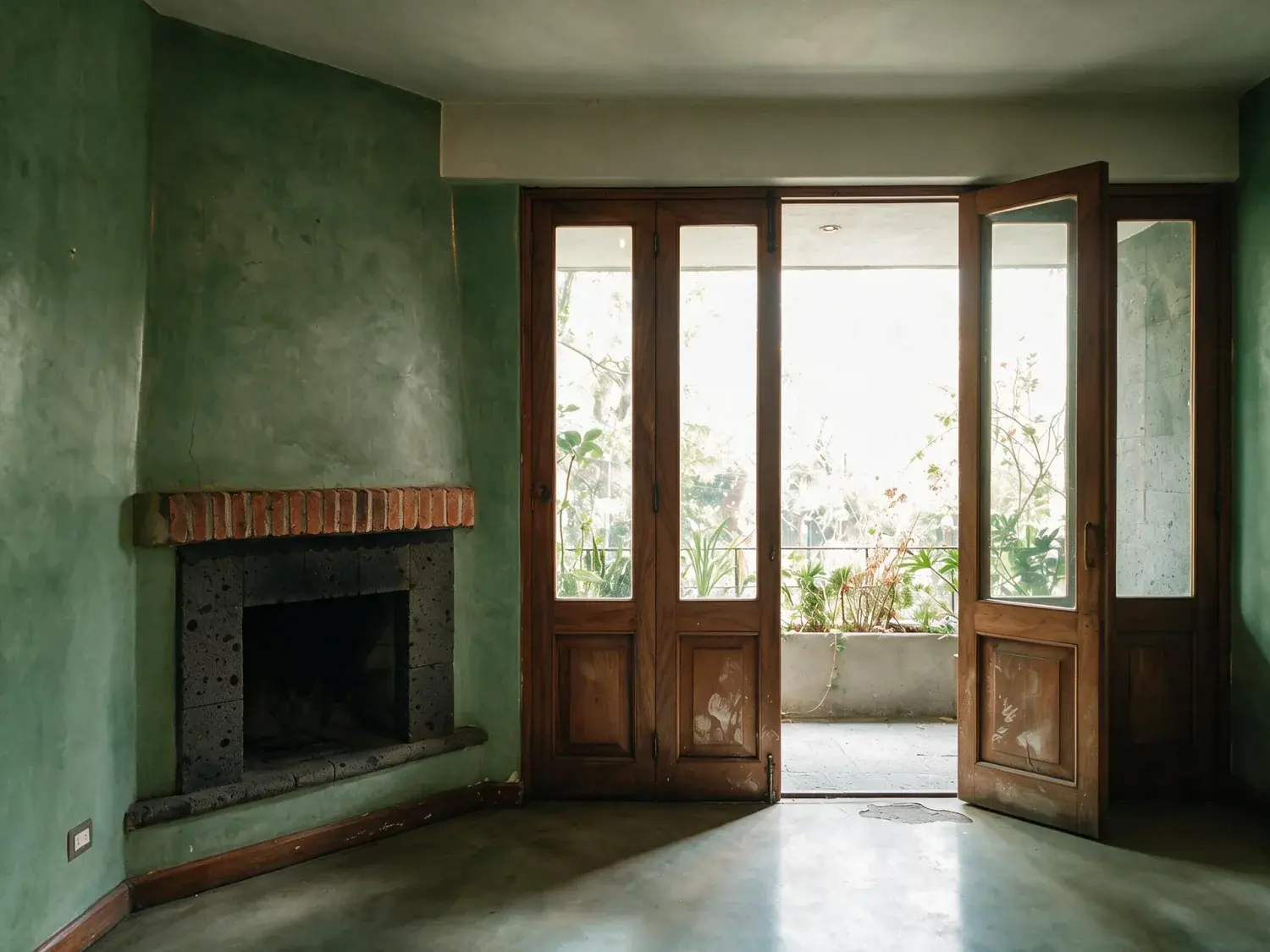
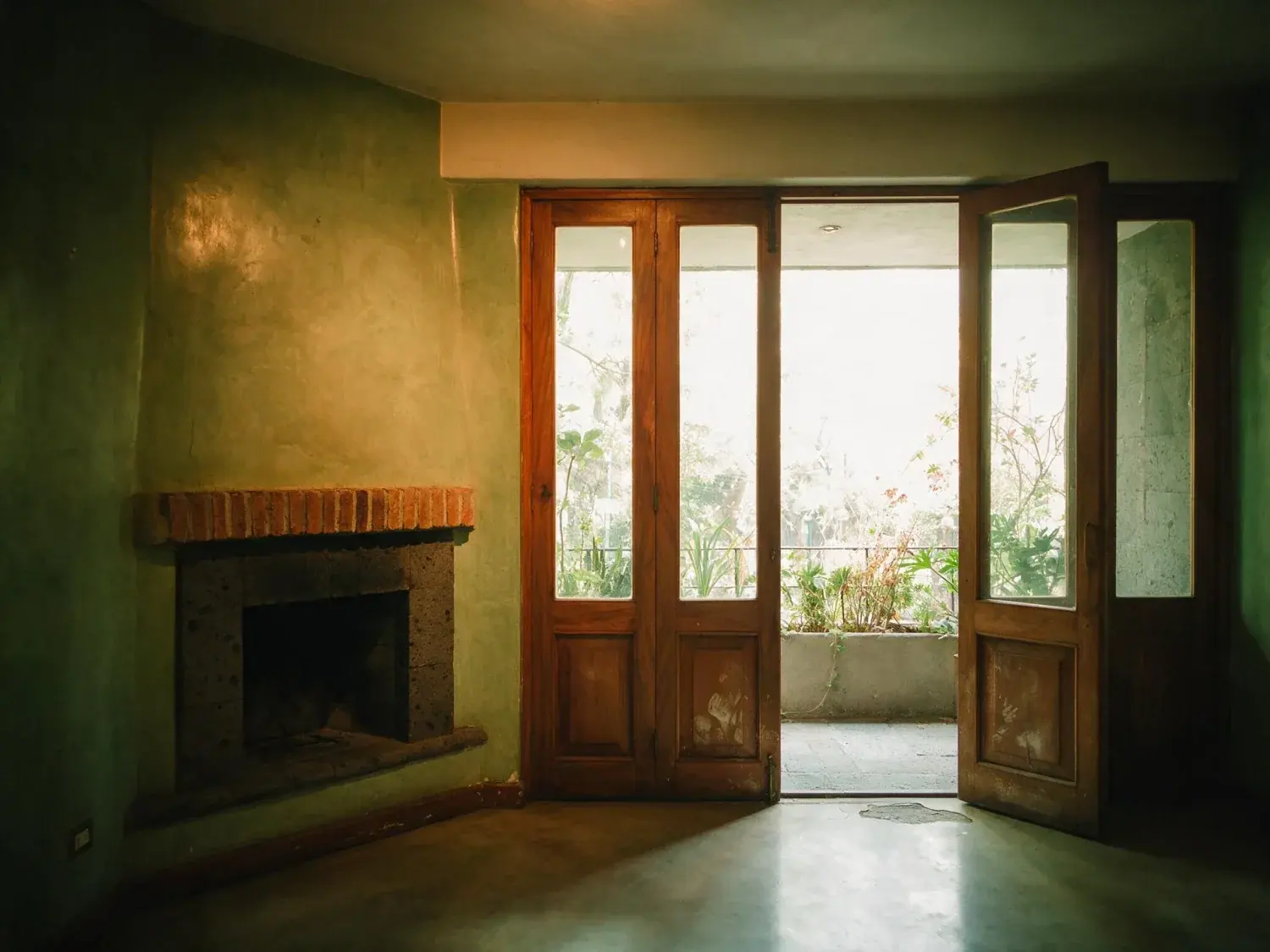
Before and after of a Polanco apartment, dim with the terrace doors overexposed. — enhanced by Plotpane
Before and after of a Polanco apartment, dim with the terrace doors overexposed. — original listing photo before editing
Before
After
01

Why the photo workflow matters at a franchise-fee brokerage

RE/MAX's agent economics are the hinge. The franchise-fee model means agents at RE/MAX cover their own marketing — there is no office line item absorbing $100-$180 per listing in outsourced enhancement, no in-house photo retoucher on salary, no corporate budget backstopping print for The RE/MAX Collection. Every dollar spent on listing imagery comes directly out of the agent's commission split. That pressure is exactly why brand-approved marketing partners like Xpressdocs, Photofy, and Agent Print built their businesses around the RE/MAX agent: the agent needs a flat-rate, predictable stack rather than a variable invoice per listing. A photo workflow that fits RE/MAX listing expectations has to hit the same price logic — one flat monthly line, a known cost per image, one export at about 2.4K that feeds every downstream asset — while still clearing the bar that Design Center templates and Collection print placements set for imagery. Plotpane is an independent AI tool. Not affiliated with, endorsed by, or a product of RE/MAX, LLC.

02

The workflow: one JPEG into Design Center, MAX/Center, LeadStreet, and Shop.REMAX.com

One source file. Every downstream placement. Plotpane exports a JPEG at quality 92, about 2.4K — the format the RE/MAX Design Center (remax.imprev.net) accepts for automated flyer, postcard, and social-card templates. The same master drops into MAX/Center (the agent intranet at remax.net), the LeadStreet CRM media library, and Shop.REMAX.com / Xpressdocs print orders for yard signs, open-house collateral, and broker-to-broker mailers. There is no TIFF export and no second file: a print supplier that wants 16-bit TIFF at 300dpi for The RE/MAX Collection magazine placements or a RE/MAX Commercial investment memorandum converts from that same 2.4K JPEG. Auto Enhance covers the MLS baseline; a Collection hero frame competing against Sotheby's International Realty and Christie's listings usually earns a second and third render — Perspective Fix, then Day to Dusk — at one credit each. Processing runs about two minutes per image on every plan, measured, which keeps a 25-image set moving same-day, before the weekly franchise-office broker meeting where listings typically get announced.

  • JPEG sRGB at about 2.4K drops into RE/MAX Design Center, MAX/Center, and LeadStreet as it comes
  • One JPEG export, no TIFF — Xpressdocs and Shop.REMAX.com print from that same file
  • Auto Enhance for the MLS baseline; Perspective Fix and Day to Dusk are separate one-credit renders
  • Structure-preserving virtual staging for empty and new-construction listings
  • two-minute per-image turnaround hits same-day listing launches and broker-meeting cutoffs
03

Two tiers: broad-market listings vs The RE/MAX Collection (luxury)

Broad-market RE/MAX listings — the detached suburban homes, townhouses, condos that make up the bulk of an agent's book in Calgary, Denver, Dallas, Toronto, Mississauga, or Monterrey — need the standard correction list: plumb verticals, neutral white balance across mixed interior lighting, recovered highlight detail on exterior walls, sky restored without HDR oversaturation, lawn gently corrected. Plotpane splits that list across tools: Auto Enhance for exposure, white balance and highlight recovery, Perspective Fix for the verticals, Sky Swap when the weather took the sky, Lawn & Pool Revive for the grass — one credit each. The RE/MAX Collection — the luxury tier with its own branded website at remax.com/luxury and dedicated Collection collateral through Shop.REMAX.com — needs the same corrections held to a higher aesthetic bar, because Collection listings compete directly against Sotheby's International Realty, Christie's International Real Estate, and the brokerage's own international Collection listings in Portugal, Italy, Spain, Mexico, and Germany. The tools are the same ones; what changes is how many of them a frame earns. A Collection hero often takes a Perspective Fix, then Auto Enhance, then a Day to Dusk on the exterior — three renders, three credits, about six minutes — so the image reads in the same magazine-grade bucket as the cross-border luxury competition rather than as something obviously broad-tier. RE/MAX Commercial listings (remaxcommercial.com) lean hardest on Perspective Fix for the architectural verticals, and that same 2.4K JPEG is what the investment-memorandum layout is built from.

For this region

Local questions, answered

How do I edit listing photos as a RE/MAX agent without paying a retoucher per listing?+

Run the full MLS set through Auto Enhance first — neutral white balance on mixed interior lighting, recovered highlight detail on exterior walls, exposure pulled back into shape — then spend a second credit only on the frames that need Perspective Fix for leaning verticals, Sky Swap for a blown-out sky, or Lawn & Pool Revive for the grass. Batches run 50 photos at once on Pro and 150 on Agency, with a ZIP download on both. Export the 2.4K JPEG for the MLS backend and for the RE/MAX Design Center (remax.imprev.net) flyer and social templates. On the franchise-fee economics — where agents at RE/MAX are covering their own marketing — Plotpane Pro at $99/mo ($79 billed annually) replaces the $100-$180 per-listing retoucher invoice and turns photo editing into a predictable flat line.

Does Plotpane output work with the RE/MAX Design Center and LeadStreet?+

Plotpane does not have a direct API integration into the RE/MAX Design Center (Imprev-powered, at remax.imprev.net) or LeadStreet, but the JPEG sRGB export, about 2.4K, drops into each one's media library in a single drag-and-drop. That same master feeds Design Center's automated flyer, postcard, and social-card templates, the MAX/Center agent portal at remax.net, the LeadStreet CRM, and Shop.REMAX.com print orders through Xpressdocs — one file, every downstream asset. The XMP AI-disclosure tag Plotpane writes into every export is informational: it records what was done to the file, and it stays in the copy you download — Design Center, LeadStreet and the MLS all re-encode on upload, so keep that copy as the dated record.

Can Plotpane produce print-grade imagery for The RE/MAX Collection magazine placements and Xpressdocs orders?+

Up to a point, and the limit is worth knowing before you subscribe. The only export is a JPEG at quality 92 — about 2.4K as standard, or roughly 4.7K if you spend a second credit on the upscale, no watermark on any paid plan — so a supplier that insists on 16-bit TIFF at 300dpi needs a conversion step you do yourself. For the sizes The RE/MAX Collection pieces actually run at — magazine placements, luxury postcards, broker-to-broker mailers, RE/MAX Commercial investment memorandums — the ~4.7K pass is the one worth the extra credit, and it is the same file you upload to the MLS. One flat monthly line, whichever tool, and no second invoice.

I am an agent at RE/MAX in Canada / Mexico / Portugal / Germany — does this workflow still apply?+

Yes. RE/MAX is the #1 brokerage in Canada by transaction sides and operates across 110+ countries on the same franchise-fee model and the same Design Center + MAX/Center + LeadStreet stack. The photo workflow is identical because the franchise-fee marketing-out-of-pocket economics are identical. The only difference is which MLS or portal the listing syndicates to — Realtor.ca and CREA in Canada, Inmuebles24 in Mexico, Idealista in Portugal, ImmobilienScout24 in Germany, Immobiliare.it in Italy, Idealista.com in Spain — and Plotpane's 2.4K JPEG sRGB output meets the spec for all of them. The RE/MAX Collection tier exists in every one of those markets, and that same JPEG export, at ~2.4K or ~4.7K for a second credit, is what the magazine-grade pieces the Collection print program distributes cross-border are laid out from.

How does this compare to ordering enhancement through Photofy, Xpressdocs, or BoxBrownie per listing?+

Photofy is the RE/MAX-approved social and branding tool; Xpressdocs is the approved print supplier for marketing materials through Shop.REMAX.com; BoxBrownie is a common outsourced enhancement vendor most agents know from industry channels. None of the three is an enhancement and structure-preserving virtual staging tool on a flat monthly fee. Plotpane sits upstream of Photofy and Xpressdocs: you enhance and stage on Plotpane, then the cleaned 2.4K exports drop into Photofy for social composition or into Xpressdocs for print. Versus BoxBrownie's per-image per-listing invoice, Plotpane Pro at $99/mo ($79 billed annually) is the flat-rate alternative that fits the franchise-fee economics instead of adding a variable invoice to every listing.

Does Plotpane replace the booj technology platform that RE/MAX acquired in 2018?+

No. booj (acquired by RE/MAX in 2018) powers core agent-technology infrastructure — LeadStreet CRM, the consumer-facing remax.com search experience, and parts of the agent website stack. Plotpane does not replace any of that. It sits upstream: Plotpane enhances and virtually stages the photos first, then that 2.4K master feeds the booj-powered agent website, the LeadStreet CRM media library, the Design Center templates, and the MLS syndication lane. It is the step that happens before everything the RE/MAX technology stack already handles.
Pricing

One credit per image.
Every tool, every plan.

Three plans. Every tool unlocked on all of them. Every render unmarked, standard or high resolution, cancel anytime.

Every plan starts with 3 free renders. No card until you subscribe.

Starter

For the solo agent shooting their own listings.

$39/month

billed yearly

100 credits monthly

  • 100 images per month — 1 credit each, whichever tool you use
  • No Plotpane mark on any render
  • Every tool, no tier gating
  • Standard output ~2.4K, or ~4.7K for a second credit
  • XMP disclosure metadata written into every export
  • Download a finished listing as a ZIP
  • Free vertical listing reel from your finished photos
  • Cinematic clips from a single photo — 1 credit per second of video
  • Up to 10 photos per batch
  • Email support
Subscribe to Starter

For one agent, listing by listing.

Most popular

Pro

For top-producing agents and real-estate photographers.

$79/month

billed yearly

220 credits monthly

  • 220 images per month — 1 credit each, whichever tool you use
  • No Plotpane mark on any render
  • Up to 50 photos per batch, one tool across the shoot
  • Download a finished listing as a ZIP
  • Free vertical listing reel from your finished photos
  • Everything in Starter
  • Priority support
Subscribe to Pro

The plan a working photographer buys.

Agency

For brokerages, teams, and photography networks.

$199/month

billed yearly

600 credits monthly

  • 600 images per month — 1 credit each, whichever tool you use
  • No Plotpane mark on any render
  • Up to 150 photos per batch
  • Download a finished listing as a ZIP
  • Free vertical listing reel from your finished photos
  • Everything in Pro
  • Direct line to the founder, not a ticket queue
Subscribe to Agency

For a brokerage running whole shoots.

FeatureStarter$39/mo annualPro$79/mo annualAgency$199/mo annual
Renders per month100220600
Credits per image111
All seven tools
Free renders on sign-up333
Plotpane mark on the imageNoneNoneNone
Standard output (~2.4K)
High resolution (~4.7K, second credit)
XMP disclosure written into every export
Optional visible “Virtually Staged” label
Photos per batch1050150
Download a set as a ZIP
Refund a render that came back wrong
SupportEmailPriority emailDirect to the founder
Cancel anytime, one click
At volume

A 25-photo listing costs 25 credits.

That is the whole pricing model. No per-tool rates, no seat maths, nothing to negotiate. We are not SOC 2 certified and there is no SSO, private deployment or API — if you need those to buy, better you know now than after a call.

Starter

4

listings
a month

Pro

8

listings
a month

Agency

24

listings
a month

Questions

The usual questions,
answered directly.

  • No. Midjourney and DALL-E invent scenes from text prompts — beautiful for art, disqualifying for a listing. Plotpane is a structure-preserving pipeline: your room geometry, windows, and floor plan stay exact. We stage, re-light, swap skies, declutter, and enhance your actual photo. No hallucinated architecture, no invented rooms.

  • BoxBrownie and Styldod are human-edit services: you upload, a retoucher works overnight, you get a result in 24–48 hours at $2–$32 per image per treatment. They also sell things we do not have at all — floor plans, renderings, item removal by a person who can ask you what you meant. Plotpane is one machine pass: you pick one of seven tools, and the image comes back in about two minutes for one credit, whichever tool you picked, on a flat monthly subscription. Stacking two treatments on one photo means running it twice.

  • Yes, when disclosed. NAR guidelines, California AB 723, and REBNY Rule 3.3 all allow virtually staged photos provided the listing discloses them. Every Plotpane export embeds invisible XMP disclosure metadata so the staging record travels with the file. You still handle the listing-remarks disclosure in your MLS portal — that's the part only you can do.

  • Every render is sent with a preserve list as well as an instruction. It names one operation and forbids the rest: do not touch windows, doors, walls, ceilings, floors, cabinetry or fixtures unless the instruction names them; do not remove or conceal a defect, stain or crack; do not change what is visible through glass, and never invent a view. Furniture is added to empty rooms; named objects are removed from furnished ones; sky and light are re-graded. If you do see something invented, that is a bug — report the render in the app and the credit comes back.

  • Yes — one click in the Stripe billing portal from your dashboard. Billing stops immediately, remaining credits stay usable through the end of the billing period, and there's no cancellation fee.

  • Yes — any AI-generated or AI-modified image is considered an edit requiring disclosure under NAR's standards. That's why every Plotpane export writes invisible XMP disclosure metadata by default. The flag is machine-readable by MLS tooling and survives Lightroom round-trips. You still add the disclosure line to your listing remarks; we make sure the image itself is self-describing.

Ready when you are

Stop re-uploading.
Start shipping listing-ready.

Seven tools, one credit an image, a finished JPEG back in about two minutes — on every plan.

Get startedSee the before/aftersEvery tool on every plan · cancel anytime