Plotpane · Historic and antika listings · global
Historic and antika listings · global

Antika Historic Home Photo Requirements for Heritage Listings

Antika historic home photo requirements protect the period character that gives a Victorian, Federal, Georgian, Tudor Revival, Queen Anne, Italianate, Prairie School or Craftsman listing its market value. Heritage homes listed on the US National Register, tracked by state historic commissions, or flagged by UK listed-building, French Monument Historique or Turkish SİT overlays fail when a generic AI 'fixes' patina, straightens settled walls, or erases cylinder-glass waves. Plotpane edits only the frame it was handed, one named operation per render, with a preserve list that runs ahead of every instruction.

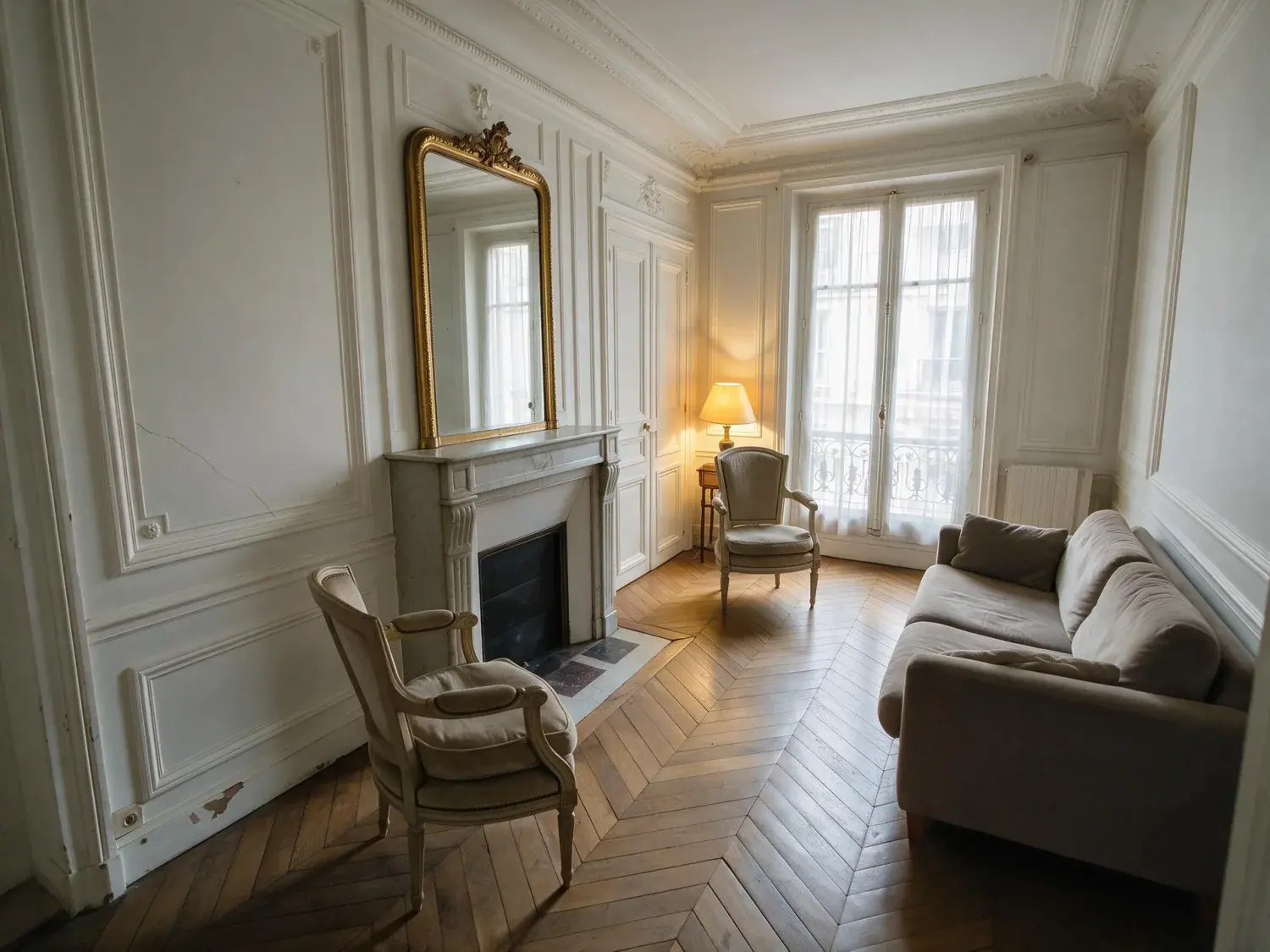
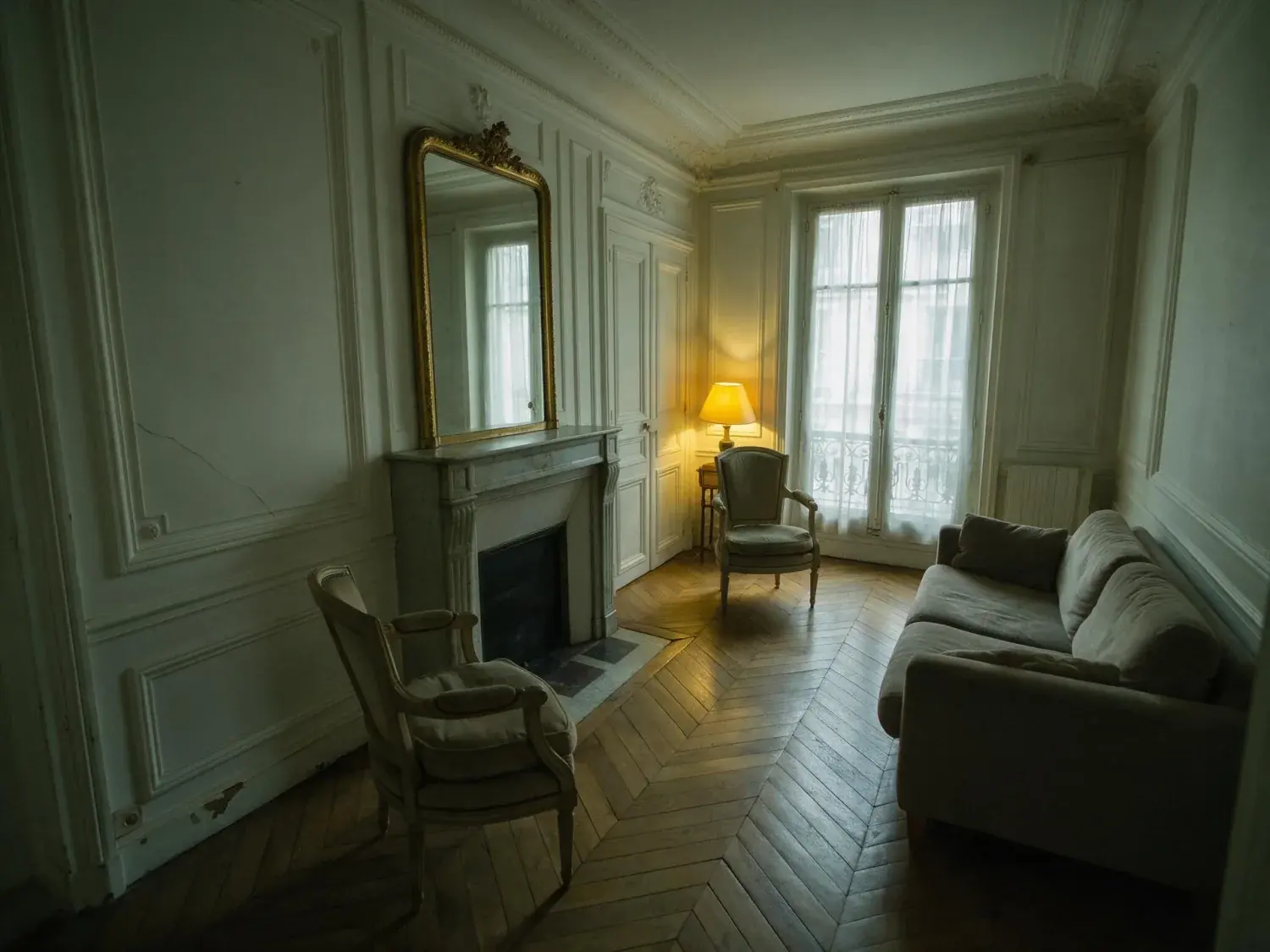
Before and after of a classic parisian salon with herringbone parquet and boiserie, lifted from murky underexposure to crisp editorial clarity — enhanced by Plotpane
Before and after of a classic parisian salon with herringbone parquet and boiserie, lifted from murky underexposure to crisp editorial clarity — original listing photo before editing
Before
After
01

What antika historic home photo requirements actually mean

Antika historic home photo requirements are a specific craft, not a generic filter, because every consumer image-enhancement tool carries a bias toward modern-new. A listing for a historic home, a Victorian home, a Georgian home, a Tudor home, or a Federal style home loses its entire thesis the moment the enhancer brightens a faded fresco, smooths aged plaster, straightens settled masonry, polishes century-worn stone floors, or 'corrects' wavy cylinder glass as if it were distortion. Buyers searching historic homes for sale are paying specifically for that patina — Plotpane is instructed on every render never to remove, soften or conceal a defect, stain, crack or sign of wear, which is what keeps the output reading like a World of Interiors, Preservation Magazine or Cornucopia feature rather than a generic portal thumbnail. Agents listing Queen Anne, Italianate, Beaux-Arts and Prairie School properties need a tool that changes only what it is told to change.
02

Preservation-safe photo workflow for historic listings

Selling a historic home or publishing a historic home for sale inside a preservation overlay — US National Register districts, National Park Service Section 106 review zones, state historic commissions, UK listed-building status, French Monument Historique, Italian beni culturali, Turkish SİT — carries disclosure duties that ripple into listing photography. A photo that implies unauthorised alteration creates legal exposure for the broker and regulatory exposure for the owner. Plotpane's preservation-safe workflow stays explicitly inside the same edit boundary a legitimate darkroom print pass would have been permitted: exposure, white balance, sky, perspective, noise. Every render is told not to touch windows, doors, walls, ceilings, floors, cabinetry or fixtures unless the instruction names them — so it will not repaint shutters, re-surface stucco, straighten a settled wall line, or invent shingles that are no longer there.

  • Patina preservation across stone, plaster, timber, and original cylinder glass
  • Colour balanced off the frame you shot, not pushed to a saturated default
  • National Register and state historic commission disclosure-safe edit boundary
  • XMP disclosure metadata in every export, readable in a preservation-authority audit
  • Seven tools, one named operation per render, one credit per image
03

Ethical AI for Victorian, Georgian, Tudor, Federal and Craftsman listings

Ethical AI for an antika listing means Plotpane will never digitally restore a historic feature that is no longer physically there. Consumer enhancers will happily rebuild missing crown molding, repaint a faded Queen Anne paintwork scheme, 'de-age' a Federal fanlight, or fake stained glass back into a Tudor Revival bay — every one of those edits is a disclosure-grade misrepresentation on a historic home listing. Plotpane clears the clutter you name and stages empty rooms; nothing in the set invents period detail. The preserve list that runs ahead of every instruction is the mechanism behind this, holding every output to the frame you uploaded plus the one narrow, darkroom-legal adjustment the tool you picked is allowed to make. That is why a Georgian home, an Italianate townhouse, or a Beaux-Arts residence comes back accurate under Auto Enhance, without the generic-default drift that punishes historic listings on MLS and portal feeds.

For this region

Local questions, answered

What makes a home historical, and does that change what we can edit in the listing photos?+

A home is treated as historical when it sits on the US National Register of Historic Places, in a locally designated historic district, under UK listed-building status, French Monument Historique, Italian beni culturali, Turkish SİT, or an equivalent state or municipal preservation overlay. That designation changes what you can edit because listing photos that imply unauthorised alteration can trigger preservation-authority review and broker disclosure duties. Plotpane stays inside the darkroom-legal boundary — exposure, white balance, sky, perspective, noise — and writes XMP disclosure metadata into every export you download, which is the dated record you produce if an audit asks. It will not repaint shutters, re-surface plaster, or restore missing molding.

How do you buy a historic home with confidence that the listing photos are accurate?+

Buyers looking at how to buy a historic home rightly worry that listing photos have hidden settled foundations, overpainted original woodwork, or faked period glass. Plotpane's preserve list is the technical answer — every output is held to the frame you uploaded plus the one narrow, preservation-safe operation you asked for, with an XMP tag that makes the render auditable. Agents shooting Victorian, Federal, Georgian, Tudor Revival, Queen Anne or Craftsman listings can publish the photos on MLS, Zillow and portal feeds knowing the patina, wavy cylinder glass, settled masonry and period color are all preserved. The buyer sees what is actually there.

Are historic homes a good investment if the listing photos only work for a niche buyer pool?+

The investor question about whether historic homes are a good investment lives or dies on presentation quality. A generic AI enhancer that flattens patina and modernises color widens the apparent buyer pool by one week and loses the heritage-buyer premium forever. Plotpane goes the other way — it changes only what you name, so historic home, antique home, heritage home and old home listings keep the register that resonates with the specific buyer paying the historic premium. Combined with the preserve list and the disclosure-safe XMP tag, agents can list across MLS, Zillow, Sotheby's, Christie's International and European editorial portals without ever fighting a preservation-authority question.

Pricing

One credit per image.
Every tool, every plan.

Three plans. Every tool unlocked on all of them. Every render unmarked, standard or high resolution, cancel anytime.

Every plan starts with 3 free renders. No card until you subscribe.

Starter

For the solo agent shooting their own listings.

$39/month

billed yearly

100 credits monthly

  • 100 images per month — 1 credit each, whichever tool you use
  • No Plotpane mark on any render
  • Every tool, no tier gating
  • Standard output ~2.4K, or ~4.7K for a second credit
  • XMP disclosure metadata written into every export
  • Download a finished listing as a ZIP
  • Free vertical listing reel from your finished photos
  • Cinematic clips from a single photo — 1 credit per second of video
  • Up to 10 photos per batch
  • Email support
Subscribe to Starter

For one agent, listing by listing.

Most popular

Pro

For top-producing agents and real-estate photographers.

$79/month

billed yearly

220 credits monthly

  • 220 images per month — 1 credit each, whichever tool you use
  • No Plotpane mark on any render
  • Up to 50 photos per batch, one tool across the shoot
  • Download a finished listing as a ZIP
  • Free vertical listing reel from your finished photos
  • Everything in Starter
  • Priority support
Subscribe to Pro

The plan a working photographer buys.

Agency

For brokerages, teams, and photography networks.

$199/month

billed yearly

600 credits monthly

  • 600 images per month — 1 credit each, whichever tool you use
  • No Plotpane mark on any render
  • Up to 150 photos per batch
  • Download a finished listing as a ZIP
  • Free vertical listing reel from your finished photos
  • Everything in Pro
  • Direct line to the founder, not a ticket queue
Subscribe to Agency

For a brokerage running whole shoots.

FeatureStarter$39/mo annualPro$79/mo annualAgency$199/mo annual
Renders per month100220600
Credits per image111
All seven tools
Free renders on sign-up333
Plotpane mark on the imageNoneNoneNone
Standard output (~2.4K)
High resolution (~4.7K, second credit)
XMP disclosure written into every export
Optional visible “Virtually Staged” label
Photos per batch1050150
Download a set as a ZIP
Refund a render that came back wrong
SupportEmailPriority emailDirect to the founder
Cancel anytime, one click
At volume

A 25-photo listing costs 25 credits.

That is the whole pricing model. No per-tool rates, no seat maths, nothing to negotiate. We are not SOC 2 certified and there is no SSO, private deployment or API — if you need those to buy, better you know now than after a call.

Starter

4

listings
a month

Pro

8

listings
a month

Agency

24

listings
a month

Questions

The usual questions,
answered directly.

  • No. Midjourney and DALL-E invent scenes from text prompts — beautiful for art, disqualifying for a listing. Plotpane is a structure-preserving pipeline: your room geometry, windows, and floor plan stay exact. We stage, re-light, swap skies, declutter, and enhance your actual photo. No hallucinated architecture, no invented rooms.

  • BoxBrownie and Styldod are human-edit services: you upload, a retoucher works overnight, you get a result in 24–48 hours at $2–$32 per image per treatment. They also sell things we do not have at all — floor plans, renderings, item removal by a person who can ask you what you meant. Plotpane is one machine pass: you pick one of seven tools, and the image comes back in about two minutes for one credit, whichever tool you picked, on a flat monthly subscription. Stacking two treatments on one photo means running it twice.

  • Yes, when disclosed. NAR guidelines, California AB 723, and REBNY Rule 3.3 all allow virtually staged photos provided the listing discloses them. Every Plotpane export embeds invisible XMP disclosure metadata so the staging record travels with the file. You still handle the listing-remarks disclosure in your MLS portal — that's the part only you can do.

  • Every render is sent with a preserve list as well as an instruction. It names one operation and forbids the rest: do not touch windows, doors, walls, ceilings, floors, cabinetry or fixtures unless the instruction names them; do not remove or conceal a defect, stain or crack; do not change what is visible through glass, and never invent a view. Furniture is added to empty rooms; named objects are removed from furnished ones; sky and light are re-graded. If you do see something invented, that is a bug — report the render in the app and the credit comes back.

  • Yes — one click in the Stripe billing portal from your dashboard. Billing stops immediately, remaining credits stay usable through the end of the billing period, and there's no cancellation fee.

  • Yes — any AI-generated or AI-modified image is considered an edit requiring disclosure under NAR's standards. That's why every Plotpane export writes invisible XMP disclosure metadata by default. The flag is machine-readable by MLS tooling and survives Lightroom round-trips. You still add the disclosure line to your listing remarks; we make sure the image itself is self-describing.

Ready when you are

Stop re-uploading.
Start shipping listing-ready.

Seven tools, one credit an image, a finished JPEG back in about two minutes — on every plan.

Get startedSee the before/aftersEvery tool on every plan · cancel anytime